
Toyota RAV4 (XA40) 2013-2018 Service Manual: Axle system
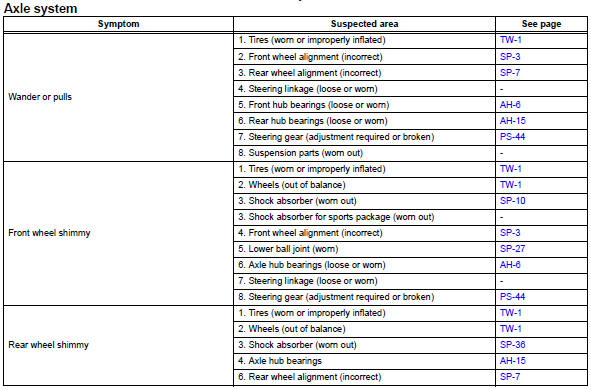
Problem symptoms table
Hint:
Use the table below to help determine the cause of the problem symptom. The potential causes of the symptoms are listed in order of probability in the "suspected area" column of the table. Check each symptom by checking the suspected areas in the order they are listed. Replace parts as necessary.
 Axle
Axle
...
 Front axle hub bolt
Components
Replacement
Hint
Use the same procedures for the rh side and lh side.
The procedures listed below are the lh side.
Remove front wheel
Remove front disc brake cylinder
...
Other materials:
Engine coolant temperature circuit range / performance problem
Description
Refer to dtc p0115 (see page es-105).
Monitor description
Engine coolant temperature (ect) sensor cold start monitor
When a cold engine start is performed and then the engine is warmed up, if
the ect sensor value does
not change, it is determined that a malfunction has occ ...
Seat position airbag sensor circuit malfunction
Description
The seat position sensor circuit consists of the center airbag sensor and the
seat position sensor.
Dtc b1653/35 is recorded when a malfunction is detected in the seat position
sensor circuit.
Wiring diagram
Inspection procedure
Check for dtc
Turn the ...
Replacement
Replace timing chain cover oil seal
Using a screwdriver and hammer, tap out the oil
seal.
Place the oil seal retainer on wooden blocks.
Apply multi-purpose grease to the lip of a new oil
seal.
Notice:
Keep the lip free of foreign objects.
Using sst and a hammer, tap in a ...
