
Toyota RAV4 (XA40) 2013-2018 Owners Manual: Back door
The back door can be locked/unlocked and opened/closed by the following procedures.
Locking and unlocking the back door
- Door lock switch
- Entry function (if equipped)
- Wireless remote control
Opening/closing the back door from inside the vehicle (vehicles with a power back door)
Press and hold the switch to open or close, when the power back door is unlocked. (A buzzer sounds.)
Pressing the switch while the back
door is opening/closing stops the
operation. 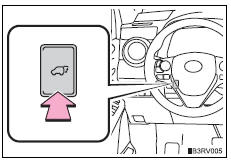
- Opening the back door from outside the vehicle
- Power back door switch (vehicles with a power back door)
- When closing the back door
- Adjusting the open position of the back door (vehicles with a power back door)
 Side doors
Unlocking and locking the doors
The vehicle can be locked and unlocked using the key, entry function,
wireless remote control or door lock switch.
Entry function (if equipped)
Wireless remote cont ...
 Opening the back door from outside the vehicle
Back door opener
Vehicles without a power
back door
Raise the back door while
pressing up the back door
opener switch.
Vehicles with a power back
door
When the back door is
unloc ...
Other materials:
Using the “setup� menu (“phone� menu)
Functions and operation procedures
To enter the menu for each function, press the “setup� button and
follow the steps below using the “tune•scroll� knob:
Adding a new phone number
1. Phone
2. Phonebook
3. Add contacts
Setting speed dials
1. Ph ...
Removal
(2006/01- )
Remove front wheel
Drain automatic transaxle fluid
Drain the automatic transaxle fluid for u140f (see
page ax-147).
Drain the automatic transaxle fluid for u241e (see
page ax-146).
Drain the automatic transaxle fluid for u151e (see
page ax-172).
Remove front axle hub nut ( ...
Headlight relay
On-vehicle inspection
Remove headlight relay
Remove the headlight relay from the engine room
no. 2 Relay block.
Measure the resistance of the relay.
Standard resistance
If result is not as specified, replace the relay. ...
