
Toyota RAV4 (XA40) 2013-2018 Service Manual: Back-up light circuit
Description
The park / neutral position switch turns on when the shift lever is moved into the r position, causing the back-up lights to illuminate.
Wiring diagram
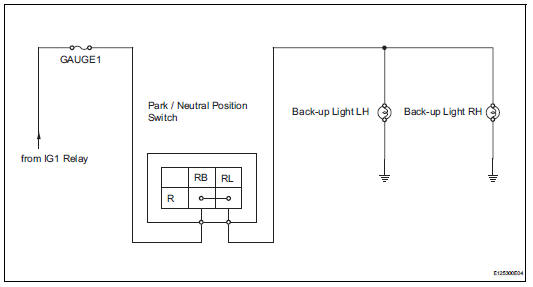
Inspection procedure
- Inspect fuse (gauge1)
- Remove the gauge1 fuse from the instrument panel junction block.
- Measure the resistance of the fuse.
Standard resistance:
below 1


- Inspect back-up light
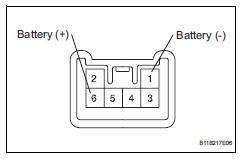
- Remove the rear combination light.
- Connect the positive (+) lead from the battery to terminal 6 and the negative (-) lead to terminal 1, then check that the light comes on.
Ok: light comes on.


- Inspect park / neutral position switch
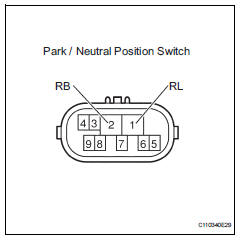
- Disconnect the b26 park / neutral position switch connector.
- Measure the resistance of the switch.
Standard resistance


- check wire harness (park / neutral position switch - battery)
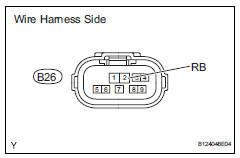
- Disconnect the b26 park / neutral position switch connector.
- Measure the voltage of the wire harness side connector.
Standard voltage


- Check wire harness (park / neutral position switch - back-up light)
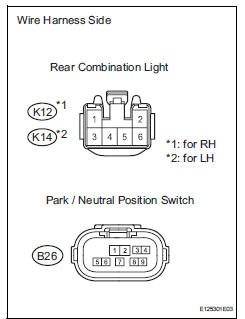
- Disconnect the b26 park / neutral position switch connector.
- Disconnect the k12 and k14 rear combination light assembly connectors
- Measure the resistance of the wire harness side connectors.
Standard resistance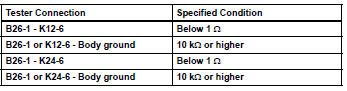


Repair or replace harness and connector (back-up light - body ground)
 Hazard warning switch circuit
Description
When the hazard warning signal switch is turned on, the turn signal flasher
relay (marking: flsh) in the
main body ecu turns on to flash the hazard warning signal lights.
Wiring diagr ...
 Light control switch circuit
Description
This circuit detects the state of the headlight dimmer switch.
Wiring diagram
Inspection procedure
Read value of intelligent tester (main body ecu)
Connect the intelligent ...
Other materials:
Smart key system
The following operations
can be performed simply by
carrying the electronic key
on your person, for example
in your pocket. The driver
should always carry the
electronic key.
Locks and unlocks the side
doors
Locks and unlocks the back
door
Starts the engine
â– Antenna location
Antennas ou ...
If your vehicle needs to be
towed
If towing is necessary, we
recommend having your
vehicle towed by your
Toyota dealer or commercial
towing service, using a
wheel-lift type truck or flatbed
truck.
Use a safety chain system
for all towing, and abide by
all state/provincial and local
laws.
Situations when it is necessary
to contact d ...
Removal
Drain engine coolant (see page co-6)
Disconnect cable from negative battery
terminal
Caution:
Wait at least 90 seconds after disconnecting the
cable from the negative (-) battery terminal to
prevent airbag and seat belt pretensioner activation.
Remove air cleaner cap (see page es-41 ...
