
Toyota RAV4 (XA40) 2013-2018 Service Manual: Data list / active test
- Read data list
Hint:
Using the intelligent tester's data list allows switch, sensor, actuator and other item values to be read without removing any parts. Reading the data list early in troubleshooting in one way to save time.
- Connect the intelligent tester (with can vim) to the dlc3.
- Turn the ignition switch on.
- Read the data list according to the display on the tester.
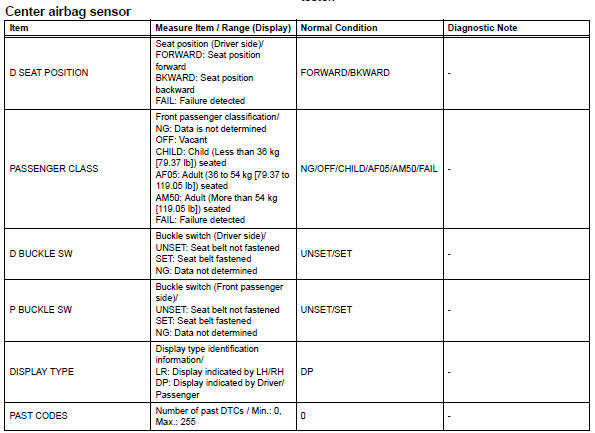
 Check mode procedure
Check mode (signal check)
Connect the intelligent tester (with can vim) to the
dlc3.
Turn the ignition switch on.
Select the "signal check", and continue
checking with t ...
 Diagnostic trouble code chart
If a dtc is displayed during the dtc check, check the circuit
listed for the dtc in the table below (refer to the appropriate
page).
Hint:
When the srs warning light remains on and the normal
...
Other materials:
Meter control switches
: Change the screen
and move the cursor
: Change displayed
content and scroll up/down the screen
Press: Enter/Set
Press and hold: Reset/Display
customizable items/Display
the cursor
Move the main meter and
return to the previous screen
Call sending/receiving and
history display
Link ...
Vehicle lift and support locations
Notice about vehicle condition when
jacking up vehicle
The vehicle must be unloaded before jacking up /
lifting up the vehicle. Never jack up / lift up a heavily
loaded vehicle.
When removing heavy parts such as the engine and
transmission, the center of gravity of the vehicle
m ...
On-vehicle inspection
Check steering pad assembly (vehicle not involved in collision and
airbag not deployed)
Perform a diagnostic system check (see page rs-
49).
With the steering pad (with airbag) installed on the
vehicle, perform a visual check:
check for cuts, cracks or discoloration on the
...
