
Toyota RAV4 (XA50) 2019-2026 Owners Manual: Hood
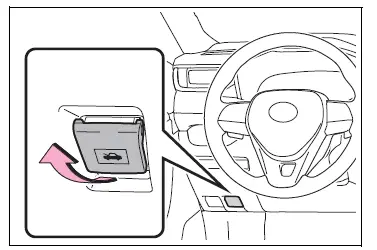
Release the lock from the inside of the vehicle to open the hood.
Opening the hood
1. Pull the hood lock release lever.
The hood will pop up slightly.
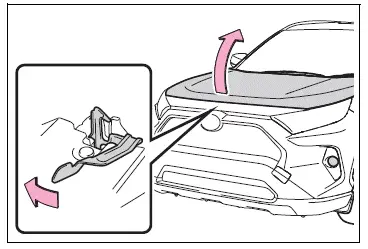
2. Push the auxiliary catch lever to the left and lift the hood.
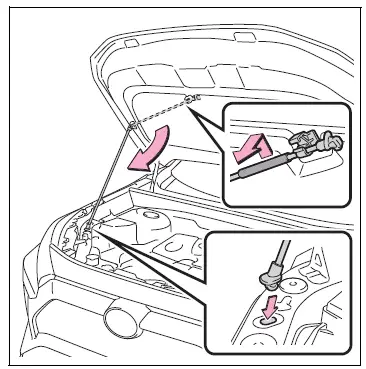
3. Hold the hood open by inserting the supporting rod into the slot.
WARNING
â– Pre-driving check
Check that the hood is fully closed and locked.
If the hood is not locked properly, it may open while the vehicle is in motion and cause an accident, which may result in death or serious injury.
â– To prevent injuries
The support rod may be hot after driving the vehicle. Touching the hot support rod may lead to burns or other serious injuries.
â– After installing the support rod into the slot
Make sure the rod supports the hood securely from falling down on to your head or body.
WARNING
â– When closing the hood
When closing the hood, take extra care to prevent your fingers etc.
from being caught.
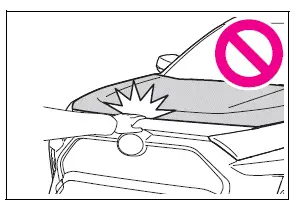
NOTICE
â– When closing the hood
Be sure to return the support rod to its clip before closing the hood.
Closing the hood without returning the support rod properly could cause the hood to bend.
Positioning a floor jack
When using a floor jack, follow the instructions in the manual provided with the jack and perform the operation safely.
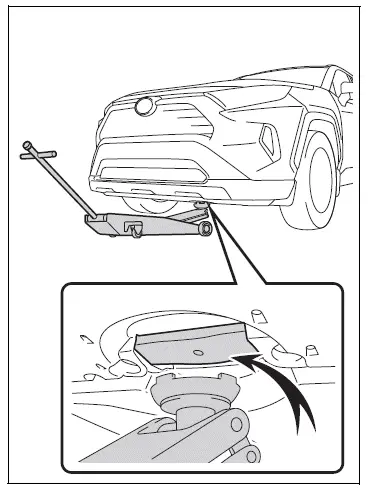
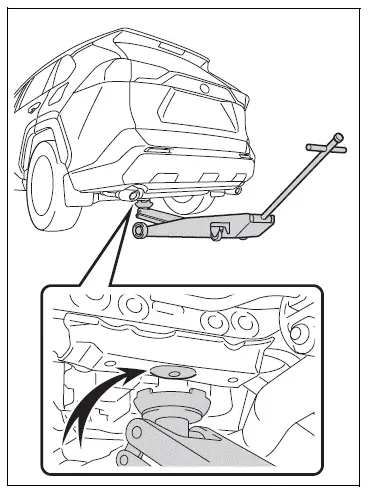
When raising your vehicle with a floor jack, position the jack correctly.
Improper placement may damage your vehicle or cause injury.
Location of the jack point
â– Front
â– Rear
 Do-it-yourself service precautions
If you perform maintenance
by yourself, be sure to follow
the correct procedure
as given in these sections.
Maintenance
WARNING
The engine compartment contains
many mechanisms and fluids that
may m ...

Other materials:
Precaution
Precaution for vehicle with srs airbag and
seat belt pretensioner
Some operations in this section may affect the srs
airbags and seat belt pretensioner. Prior to
performing the corresponding operations, read the
srs airbag notice (see page rs-1).
Components
...
Test mode procedure
Test mode check
Hint:
When entering the test mode, the tire pressure
warning ecu sets all the test dtcs first. After
completing the test mode for each inspection item, the
dtcs that are determined normal by the tire pressure
warning ecu will be erased.
The dtcs for other inspec ...
Precaution
Handling precautions for srs airbag
system
Handling precautions for srs airbag system (see
page rs-1).
Handling precautions for steering
column
When handling the steering column assembly.
Avoid any impact to the steering column
assembly, especially to the motor or ...
