
Toyota RAV4 (XA40) 2013-2018 Service Manual: Diagnosis system
- Description
Power door lock control system data can be read in the data link connector 3 (dlc3) of the vehicle. When the system seems to be malfunctioning, use the intelligent tester to check for malfunctions and perform repairs.
- Check dlc3
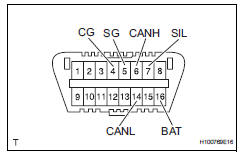
- The ecu uses iso 15765-4 for communication.
The terminal arrangement of the dlc3 complies with iso 15031-3 and matches the iso 15765-4 format.
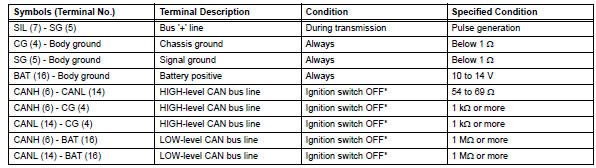
Notice:
*: Before measuring the resistance, leave the vehicle for at least 1 minute and do not operate the ignition switch, any switches or doors.
If the result is not as specified, the dlc3 may have a malfunction. Repair or replace the harness and connector.
Hint:
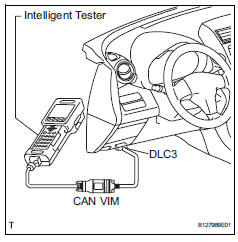
Connect the cable of the intelligent tester to the dlc3, turn the ignition switch on and attempt to use the tester. If the display indicates that a communication error has occurred, there is a problem either with the vehicle or with the tester.
- If communication is normal when the tester is connected to another vehicle, inspect the dlc3 of the original vehicle.
- If communication is still not possible when the tester is connected to another vehicle, the problem may be in the tester itself. Consult the service department listed in the tester's instruction manual.
 Terminals of ecu
Check instrument panel junction block (main body ecu)
Disconnect the ib and ie junction block connectors.
Measure the voltage and resistance of the wire
harness side connectors.
...
 Data list / active test
Read data list
Hint:
Using the intelligent tester's data list allows switch,
sensor, actuator and other item values to be read without
removing any parts. Reading the data list early in
trou ...
Other materials:
Lumbar support adjuster assembly
Inspection
Inspect lumbar support adjuster assembl
Check operation of the lumbar support adjuster.
Check if the lumbar support adjuster moves
smoothly when the battery is connected to the
lumbar support adjuster motor connector
terminals.
Ok
If the result is not as spec ...
Check mode procedure
Check mode (signal check)
Connect the intelligent tester (with can vim) to the
dlc3.
Turn the ignition switch on.
Select the "signal check", and continue
checking with the intelligent tester.
Notice:
Select the "signal check" from the "dtc
check&quo ...
Diagnosis system
Description
Data of the system can be read through the data
link connector 3 (dlc3) of the vehicle.
Therefore, when the system seems to be
malfunctioning, use the intelligent tester to check for
a malfunction and repair it.
Check dlc3
The vehicle's ecm uses iso 157 ...
