
Toyota RAV4 (XA40) 2013-2018 Service Manual: Data list / active test
- Read data list
Hint:
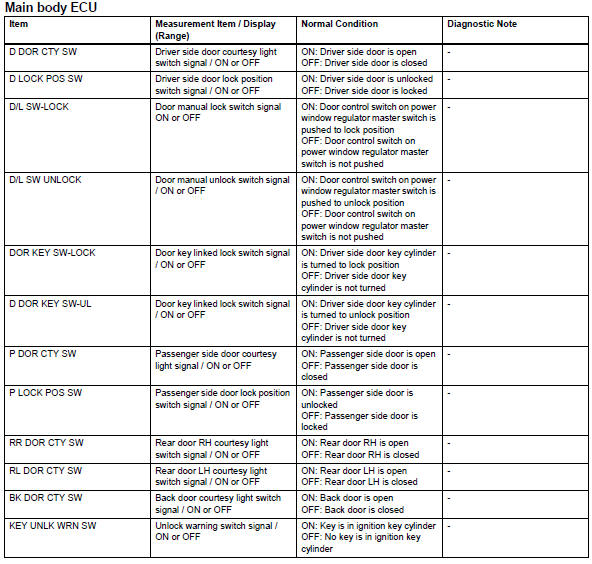
Using the intelligent tester's data list allows switch, sensor, actuator and other item values to be read without removing any parts. Reading the data list early in troubleshooting is one way to save time.
- Connect the intelligent tester (with can vim) to the dlc3.
- Turn the ignition switch on.
- Read the data list on the tester's screen.
- Perform active test
Hint:
Performing the intelligent tester's active test allows relay, vsv, actuator and other items to be operated without removing any parts. Performing the active test early in troubleshooting is one way to save time.
The data list can be displayed during the active test.
- Connect the intelligent tester (with can vim) to the dlc3.
- Turn the ignition switch on.
- Perform the active test according to the display on the tester.

- All doors cannot be locked / unlocked simultaneously
- Only driver door lock / unlock functions do not operate
- Only passenger door lock / unlock functions do not operate
- Only rear door lh lock / unlock functions do not operate
- Only rear door rh lock / unlock functions do not operate
- Only back door lock / unlock functions do not operate
- Key lock-in prevention function does not work properly
 Diagnosis system
Description
Power door lock control system data can be read in the
data link connector 3 (dlc3) of the vehicle. When the
system seems to be malfunctioning, use the intelligent
tester to check ...
 All doors cannot be locked / unlocked simultaneously
Description
The main body ecu receives switch signals from the door control switch on the
power window regulator
master switch, door control switch and driver side door key cylinder, and
activat ...
Other materials:
Installation
Hint:
Use the same procedures for the rh side and lh side.
The procedures listed below are for the lh side.
Install rear stabilizer bush
Install the 2 bushes.
Hint:
Install each bush to the outer side of the bush
stopper on each stabilizer bar.
Install each bush with ...
Communication
Description
When a key is inserted into the ignition key cylinder but no communication
occurs between the key and
transponder key ecu, dtc b2796 is output. When a key is inserted into the
ignition key cylinder but a
communication error occurs between the key and transponder key ecu, dtc b ...
System description
Lighting system
Illumination control system (illuminated entry
system):
When the doors are unlocked by a key or
transmitter operation, or when a door is opened or
closed, the illuminated entry system turns on the
room light, map light, foot light and ignition key
cylinder light*1 o ...
