
Toyota RAV4 (XA40) 2013-2018 Service Manual: Only back door lock / unlock functions do not operate
Description
The main body ecu receives lock / unlock switch signals and activates the door lock motor accordingly.
Wiring diagram
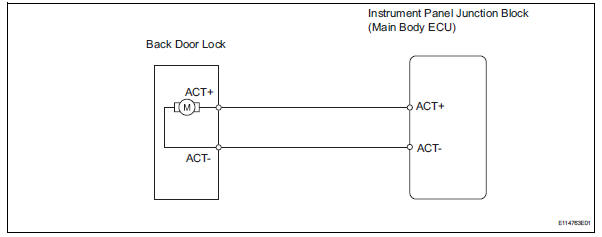
Inspection procedure
- Inspect back door with motor lock assembly
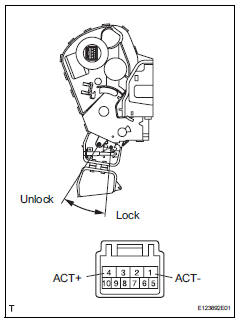
- Apply the battery voltage to the door lock motor and check the operation of the door lock motor.
Ok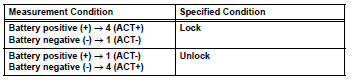


- Check wire harness (door lock - ecu)
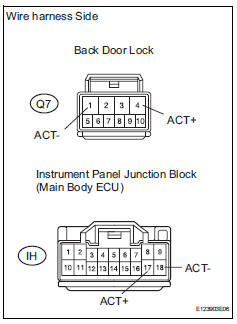
- Disconnect the q7 door lock connector.
- Disconnect the ih junction block connector.
- Measure the resistance of the wire harness side connectors.
Standard resistance 


Replace instrument panel junction block (main body ecu)
 Only rear door rh lock / unlock functions do not operate
Description
The main body ecu receives lock / unlock switch signals and activates the
door lock motor accordingly.
Wiring diagram
Inspection procedure
Inspect rear door with motor lock as ...
 Key lock-in prevention function does not work properly
Description
When the key is in the ignition key cylinder or the door courtesy light on
signal is output to the main body
ecu, performing the door lock operation with the lock switch does not lock ...
Other materials:
Changing settings of the
pre-collision system
â– Enabling/disabling the pre-collision
system
The pre-collision system can be
enabled/disabled on the
screen of the
multi-information display.
The system is automatically
enabled each time the engine
switch is turned to ON.
If the system is disabled, the
PCS warning light will turn on
and a mes ...
Diagnosis system
Description
Air conditioning system data and the diagnostic
trouble codes (dtcs) can be read through the
data link connector 3 (dlc3) of the vehicle. When
the system seems to be malfunctioning, use the
intelligent tester to check for malfunctions and
perform troubleshooting.
...
Settings display
Vehicle settings and the content
displayed on the screen can be
changed by using the meter
control switches.
â– Setting procedure
1. Press and hold to display
the cursor on the content display
area (center).
2. Press or
with the cursor
on the content display
area (center) to select
and then pre ...
