
Toyota RAV4 (XA40) 2013-2018 Service Manual: For vehicles equipped with vehicle stability (vsc) system
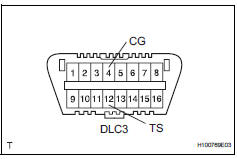
- Notices when using drum tester
- Before beginning testing, disable the vsc. To disable the vsc, turn the ignition switch off and connect sst to terminals 12 (ts) and 4 (cg) of the dlc3.
Sst 09843-18040
Notice:
- Confirm that the vsc warning light blinks.
- Vsc system will be reset when the engine is started.
- For safety, secure the vehicle with restraint chains while using a wheel dynamometer.
- Notices of related operations to vsc
- Do not carry out unnecessary installation and removal as it might affect the adjustment of vsc related parts.
- Be sure to follow the instructions for work preparation and final confirmation of proper operation of the vsc system.
 For vehicles equipped with mobile communication systems
Install the antenna as far away from the ecu and
sensors of the vehicle electronic systems as
possible.
Install an antenna feeder at least 20 cm (7.87 In.)
Away from the ecu and sensors ...
 When servicing active torque control 4wd vehicles
The active torque control 4wd rav4 is equipped
with the 4 wheel drive control system.
If incorrect preparations or test procedures are
used, the test will not only be unsuccessful, but may
...
Other materials:
Exterior
The shape of the headlights may differ depending on the grade, etc.
Side doors
Locking/unlocking
Opening/closing the side windows
Locking/unlocking by using the key
Warning messages
Back door
Locking/unlocking
Opening from inside the cabin*
Opening from outside
Warning messages
Outs ...
Spiral cable
Components
Removal
Caution:
Be sure to read the precautionary notices concerning the
srs airbag system before servicing it (see page rs-1).
Disconnect cable from negative battery
terminal
Caution:
Wait at least 90 seconds after disconnecting the
cable from the negative (-) battery ...
Panoramic moon roof
Use the overhead switches
to operate the panoramic
moon roof and electronic
sunshade.
Operating the electronic
sunshade and panoramic
moon roof
â– Opening and closing the
electronic sunshade
Opens the electronic sunshade*
Slide and hold the switch
backward. The electronic sunshade
will fully ...
