
Toyota RAV4 (XA40) 2013-2018 Service Manual: Front door courtesy switch
Components
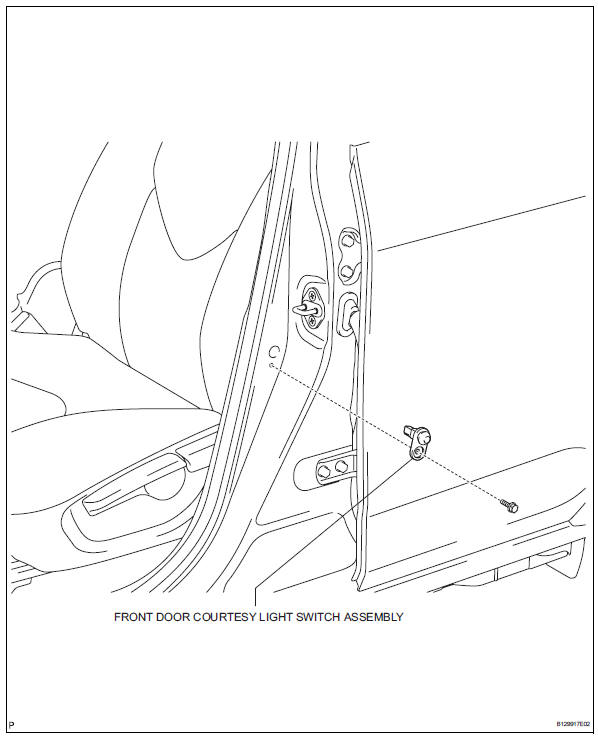
Removal
Hint:
- Use the same procedures for the rh and lh sides.
- The procedures listed below are for the lh side.
- Disconnect cable from negative battery terminal
Caution:
Wait at least 90 seconds after disconnecting the cable from the negative (-) battery terminal to prevent airbag and seat belt pretensioner activation.
- Remove front door courtesy light switch assembly
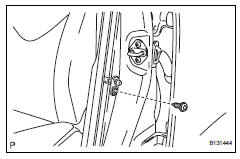
- Remove the bolt and switch.
- Disconnect the connector.
Inspection
- Inspect front door courtesy light switch assembly
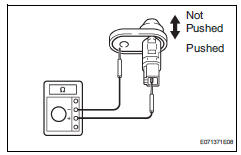
- Measure the resistance of the switch.
Standard resistance 
If the result is not as specified, replace the switch assembly.
 Hazard warning switch
Components
Removal
Disconnect cable from negative battery
terminal
Caution:
Wait at least 90 seconds after disconnecting the
cable from the negative (-) battery terminal to
prevent ai ...
 Rear door courtesy switch
Components
Removal
Hint:
Use the same procedures for the rh and lh sides.
The procedures listed below are for the lh side.
Disconnect cable from negative battery
terminal
Cautio ...
Other materials:
Data list / active test
Read data list
Hint:
Using the intelligent tester's data list allows switch,
sensor, actuator and other item values to be read without
removing any parts. Reading the data list early in
troubleshooting is one way to save time.
Connect the intelligent tester (with can vim) to the
...
System diagram
System diagram (2005/11-2006/01)
System diagram (2006/01- )
...
Ecu malfunction
Description
Inspection procedure
If the power steering ecu detects these dtcs, it will shut off the motor
relay circuit (built into the power
steering ecu) and stop power assist. However, power assist continues if dtc
c1533 is output.
Reconfirm dtc
Check for dtc.
Ok:
dtc i ...
