
Toyota RAV4 (XA40) 2013-2018 Service Manual: How to proceed with troubleshooting
Notice:
- Dtcs for the can communication system are as follows: u0073, u0100, u0105, u0121, u0122, u0123, u0124, u0126, u0129, c1280, c1296, c1297, and b1499.
- Refer to the troubleshooting procedures of each system if dtcs regarding the can communication system are not output.
- Turn the ignition switch off before measuring the resistances of the main wire and the branch wire.
- After the ignition switch is turned off, check that the key reminder warning system and light reminder warning system are not in operation.
- Before measuring the resistance, leave the vehicle for at least 1 minute and do not operate the ignition switch, any switches or doors. If doors need to be opened in order to check connectors, open the doors and leave them open.
Hint:
- *: Use the intelligent tester (with can vim).
- Operating the ignition switch, any switches or any doors triggers related ecu and sensor communication with the can, which causes resistance variation.
- Vehicle brought to workshop

- Inspect battery voltage
Standard voltage:: 11 to 14 v
If the voltage is below 11 v, recharge or replace the battery before proceeding.

- Check can bus line
- Check the can bus line (see page ca-75).

- Check installed systems (ecu and sensor) that use can communication

- Check and clear dtc*

- Check intelligent tester via can vim*
- Select "communication bus check" (see page ca- 34).
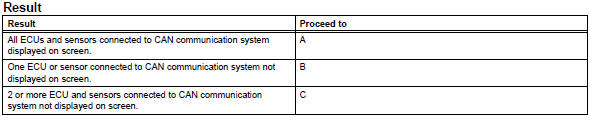
Notice:
- The systems (ecus and sensors) that use can communication vary depending on the vehicle and option settings. Check which systems (ecus and sensors) are installed on the vehicle (see page ca-34).
- Non-installed ecus or sensors are not displayed. Do not mistake them for being in communication stop mode
- If 2 or more ecus or sensors are not displayed on the intelligent tester, perform troubleshooting for open circuits in one side of the can branch line for each undisplayed ecu or sensor.

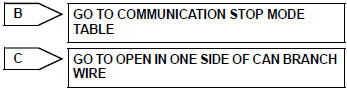
- Dtc combination table
- Confirm the trouble according to the combination of output dtcs regarding the can communication system.
Hint:
Previous can communication system dtcs may be the cause if can communication system dtcs are output and all ecus and sensors connected to the can communication system are displayed on the intelligent tester "communication bus check" screen.
- Check the dtc combination table (see page ca-34).

- Circuit inspection

- Identify problem

- Repair or replace

- Confirmation test

End
 System description
Brief description
The can (controller area network) is a serial data
communication system for real time application. It is
a vehicle multiplex communication system which
has a high comm ...
 Problem symptoms table
(2005/11-2006/01)
(2006/01- )
Hint:
*: For 4wd ...
Other materials:
Curtain shield airbag assembly
Components
On-vehicle inspection
Check curtain shield airbag assembly (vehicle not involved in
collision)
Perform a diagnostic system check (see page rs-
49).
With the curtain shield airbag assembly installed on
the vehicle, perform a visual check. If any of the
defects ...
Driving position memory
This feature automatically
adjusts the driver's seat to
suit your preferences.
Your preferred driving position
(the position of the
driver's seat) can be
recorded and recalled by
pressing a button.
Two different driving positions
can be recorded into
memory.
Each electronic key can be
registered ...
Making a phone call
To enter the “phone� mode, press the off-hook switch.
Making a phone call
Dialing by inputting a name
Speed dialing
Dialing by entering the number
Dialing from call histories
Receiving a phone call
Answering the phone
Refusing the call
Operations during a call
Transfer ...
