
Toyota RAV4 (XA40) 2013-2018 Service Manual: Inspection
- Inspect camshaft timing oil control valve assembly
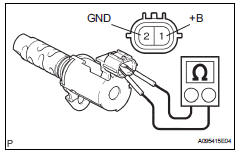
- Measure the resistance of the oil control valve.
Standard resistance 
If the result is not as specified, replace the oil control valve assembly.
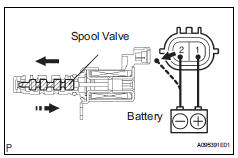
- Check the operation.
- Apply battery voltage across the terminals and check that the spool valve operates.
Notice:
Check that the spool valve is not stuck.
Hint:
The spool valve may not return if foreign objects are caught in it. This may cause subtle pressure leaks to the advance side, and a dtc may be set.
 Removal
Disconnect cable from negative battery
terminal
Caution:
Wait at least 90 seconds after disconnecting the
cable from the negative (-) battery terminal to
prevent airbag and seat belt preten ...
 Installation
Install camshaft timing oil control valve
assembly
Apply a light coat of engine oil to the o-ring of the oil
control valve.
Install the oil control valve with the bolt.
Torque: 9 ...
Other materials:
Alarm
The alarm uses light and
sound to give an alert when
an intrusion is detected.
The alarm is triggered in the
following situations when
the alarm is set:
Vehicles without smart key
system: A locked door is
unlocked or opened in any
way other than using the
wireless remote control or
key. (The ...
Gauges and meters (with 12.3-inch multi-information display)
The meters display various drive information.
Meter display
â– Locations of gauges and meters
The meter type can be changed on
of the multi-information display.
Type 1/Type 2
The units of measure may differ depending on the intended destination of
the vehicle.
Multi-information display
Presen ...
Rear differential side gear shaft oil seal
Components
Removal
Drain differential oil (see page df-10)
Remove tailpipe assembly
Remove the tailpipe (see page ex-2).
Remove center exhaust assembly
Remove propeller with center bearing
shaft assembly (see page pr-3)
Remove rear differential carrier subassembl ...
