
Toyota RAV4 (XA40) 2013-2018 Service Manual: Installation
- Install water pump assembly
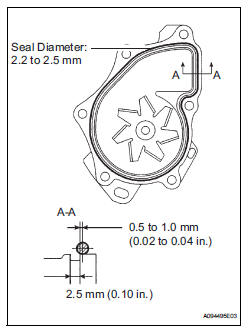
- Remove any old seal packing material from the contact surface.
- Apply a continuous line of seal packing as shown in the illustration.
Seal packing: toyota genuine seal parking black, three bond 1207b or equivalent
Standard seal diameter: 2.2 To 2.5 Mm (0.09 To 0.10 In.)
Notice:
- Remove any oil from the contact surface.
- The parts must be set within 3 minutes after applying seal packing. Otherwise, the material must be removed and reapplied.
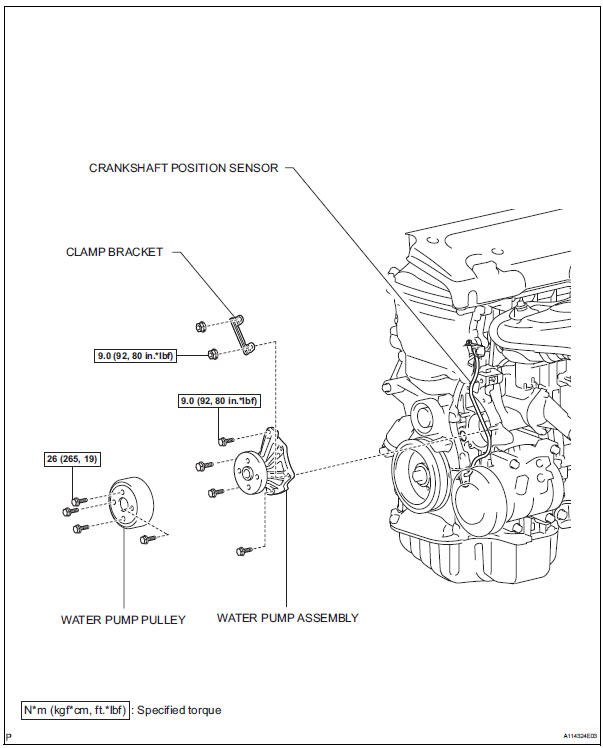
- Install the water pump and clamp bracket with the 4
bolts and 2 nuts.
Torque: 9.0 N*m (92 kgf*cm, 80 in.*Lbf)
- Install the wire of the crankshaft position sensor onto the clamp bracket.
- Install the clamp of the crankshaft position sensor onto the water pump.
- Install water pump pulley
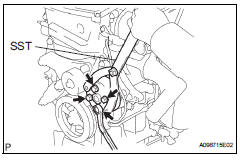
- Using sst, install the water pump pulley with the 4 bolts.
Sst 09960-10010 (09962-01000, 09963-00700) torque: 26 n*m (265 kgf*cm, 19 ft.*Lbf)
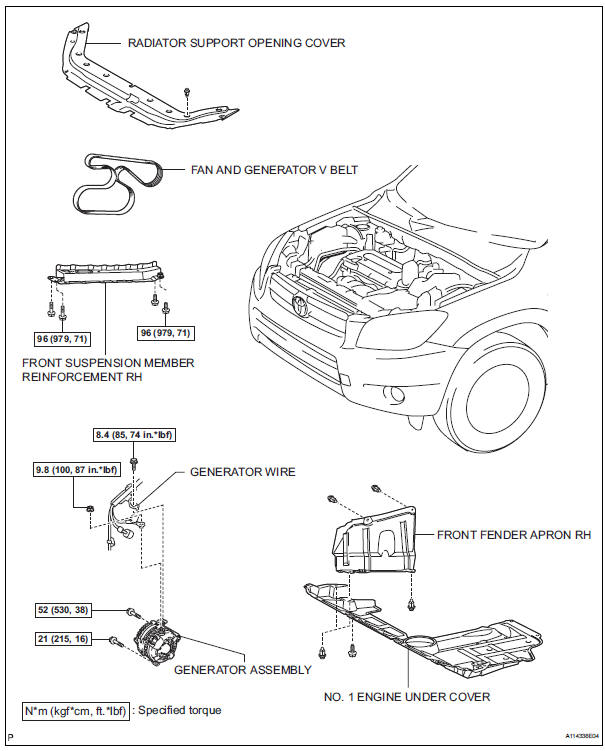
- Install generator assembly (see page ch-15)
- Install fan and generator v belt (see page em-7)
- Install front suspension member reinforcement rh (see page em-7)
- Connect cable to negative battery terminal
- Add engine coolant (see page co-6)
- Check for engine coolant leaks (see page co-1)
- Install radiator support opening cover
- Install front fender apron rh
- Install no. 1 Engine under cover
Components
 Inspection
Inspect water pump assembly
Visually check the drain hole for coolant leakage.
If leakage is found, replace the water pump
assembly.
Turn the pulley, and then check that the water ...
 Thermostat
Components
Removal
Remove no. 1 Engine under cover
Drain engine coolant (see page co-6)
Remove radiator support opening cover
Disconnect no. 2 Radiator hose
Remove water inlet
R ...
Other materials:
Check mode procedure
Panel diagnosis (indicator check)
Turn the ignition switch to lock.
Turn the ignition switch on while simultaneously
pressing the a/c control auto switch and the rec/
frs switch.
Check that all indicators and the display area are
turned on and off 4 times in succession at 1 second ...
Installation
Install starter assembly
Install the starter with the 2 bolts.
Torque: 37 n*m (377 kgf*cm, 27 ft.*Lbf)
Connect the starter connector.
Install the terminal nut and cover the nut with the
cap.
Torque: 9.8 N*m (100 kgf*cm, 7 ft.*Lbf)
Install battery bracket reinfor ...
Reporting safety defects
for u.S. Owners
If you believe that your vehicle has a defect which could cause a
crash or could cause injury or death, you should immediately
inform the national highway traffic safety administration
(nhtsa) in addition to notifying toyota motor sales, u.S.A., Inc.
(Toll-free: 1-800-331-4331).
If nhtsa re ...
