
Toyota RAV4 (XA40) 2013-2018 Service Manual: Map light assembly
Components
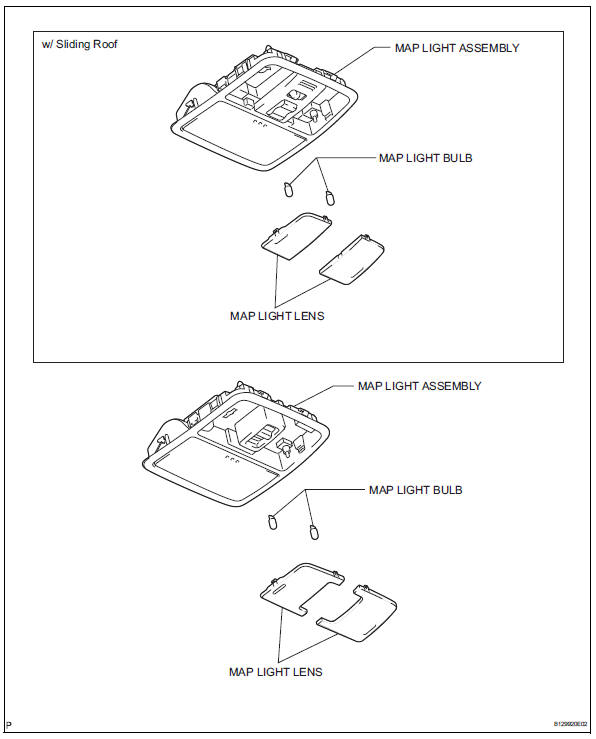
Removal
- Disconnect cable from negative battery terminal
Caution:
Wait at least 90 seconds after disconnecting the cable from the negative (-) battery terminal to prevent airbag and seat belt pretensioner activation.
- Remove map light assembly
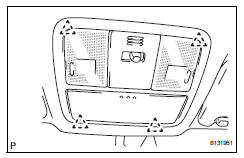
- Detach the 4 clips and remove the map light.
- Disconnect the light connector.
- Remove map light lens
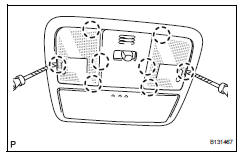
- Using a screwdriver, pry out the 8 claws and remove the map light lens.
Hint:
Tape the screwdriver tip before use.
Disassembly
- Remove map light bulb
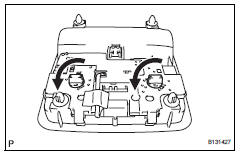
- Remove the 2 bulbs from the light.
Inspection
- Inspect map light assembly
- Connect the battery's positive (+) lead to terminal 6 and the negative (-) lead to terminal 1, and then check that the light comes on when the switch is in the door position.
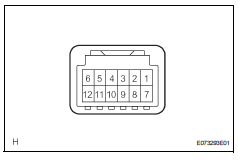
Ok: light comes on.
If the result is not as specified, replace the light assembly.
- Connect the battery's positive (+) lead to terminal 6 and the negative (-) lead to terminal 7, and then check that the light comes on when the switch is in the on position.
Ok: light comes on.
If the result is not as specified, replace the light assembly.
Reassembly
- Install map light bulb
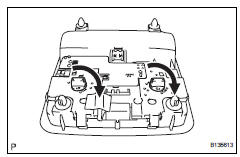
- Install the 2 bulbs to the light.
Installation
- Install map light lens
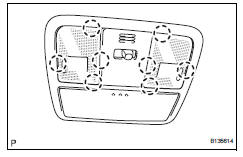
- Attach the 8 claws to install the map light lens.
- Install map light assembly
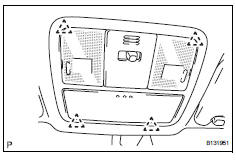
- Connect the light connector.
- Attach the 4 clips to install the map light.
- Connect cable to negative battery terminal
 High mounted stop light assembly
Components
Removal
Disconnect cable from negative battery
terminal
Caution:
Wait at least 90 seconds after disconnecting the
cable from the negative (-) battery terminal to
prevent ai ...
 Room light assembly
Components
Removal
Disconnect cable from negative battery
terminal
Caution:
Wait at least 90 seconds after disconnecting the
cable from the negative (-) battery terminal to
prevent ai ...
Other materials:
Front wiper rubber
Components
Removal
Remove front wiper blade
Detach the claw as shown in the illustration.
Remove the wiper blade as shown in the illustration.
Notice:
Do not fold the wiper arm with the wiper blade
removed. The arm tip may damage the
windshield surface.
Rem ...
Short in can bus lines
Description
There may be a short circuit between the can bus lines when the resistance
between terminals 6 (canh)
and 14 (canl) of the dlc3 is below 54
.
Wiring diagram
Inspection procedure
Notice:
Turn the ignition switch off before measuring the resistances of the
main ...
Changing the display
The multi-information display is
operated using the meter control
switches.
Scroll the screen*/switch the
display*/move the cursor
Press: Enter/Set
Press and hold: Reset/Display
customizable items
Return to the previous screen
Call sending/receiving and
history display (if equipped)
Linke ...
