
Toyota RAV4 (XA40) 2013-2018 Service Manual: High mounted stop light assembly
Components
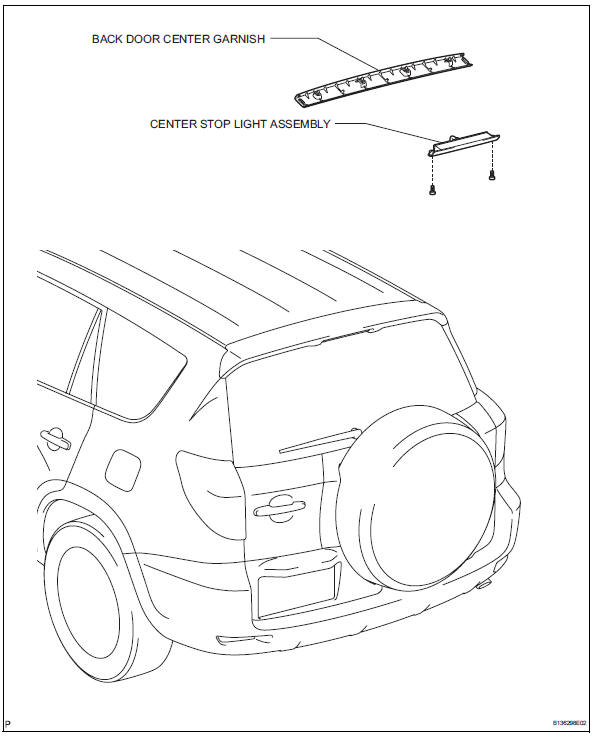
Removal
- Disconnect cable from negative battery terminal
Caution:
Wait at least 90 seconds after disconnecting the cable from the negative (-) battery terminal to prevent airbag and seat belt pretensioner activation.
- Remove back door center garnish (see page ed-59)
- Remove center stop light assembly
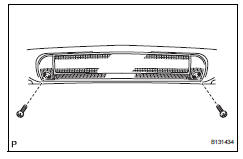
- Disconnect the connector.
- Remove the 2 screws and center stop light.
Installation
- Install center stop light assembly
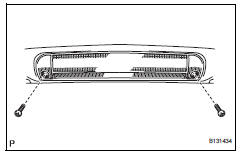
- Install the center stop light with the 2 screws.
- Connect the connector.
- Install back door center garnish (see page ed-67)
- Connect cable to negative battery terminal
 License plate light assembly
Components
Removal
Disconnect cable from negative battery
terminal
Caution:
Wait at least 90 seconds after disconnecting the
cable from the negative (-) battery terminal to
prevent ai ...
 Map light assembly
Components
Removal
Disconnect cable from negative battery
terminal
Caution:
Wait at least 90 seconds after disconnecting the
cable from the negative (-) battery terminal to
prevent ai ...
Other materials:
Rear axle hub and bearing
Components
On-vehicle inspection
Remove rear wheel
Disconnect rear drive shaft assembly lh
(for 4wd)
Disconnect the drive shaft (see page ds-69).
Remove rear disc brake cylinder assembly
lh (see page br-55)
Remove rear disc (see page br-57)
Check bearing backlash a ...
Push switch / key unlock warning switch malfunction
Description
This dtc is output if the transponder key ecu does not detect that the unlock
warning switch is on even
when the ignition switch is on. Under normal conditions, the unlock warning
switch is on when the
ignition switch is on.
Wiring diagram
Inspection procedure
Re ...
Precaution
Notice:
Take extra care to replace each part properly. Improper
installation or repair could affect the performance of
the brake system and cause a driving hazard.
It is very important to keep the brake system parts and
the work area clean when repairing the brake system.
If the vehicl ...
