
Toyota RAV4 (XA40) 2013-2018 Service Manual: License plate light assembly
Components
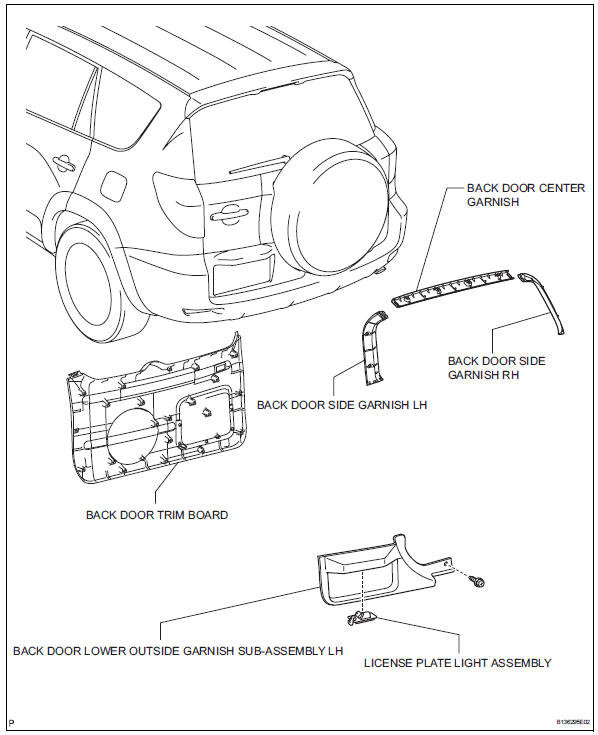
Removal
- Disconnect cable from negative battery terminal
Caution:
Wait at least 90 seconds after disconnecting the cable from the negative (-) battery terminal to prevent airbag and seat belt pretensioner activation.
- Remove back door center garnish (see page ed-59)
- Remove back door side garnish lh (see page ed-59)
- Remove back door side garnish rh (see page ed-59)
- Remove back door trim board (see page ed- 59)
- Remove back door lower outside garnish sub-assembly lh (see page et-60)
- Remove license plate light assembly
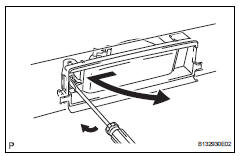
- Disconnect the connector.
- Using a screwdriver, remove the light as shown in the illustration.
Disassembly
- Remove license plate light bulb
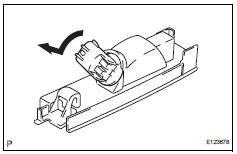
- Turn the bulb/socket unit in the direction indicated by the arrow and pull to remove it.
- Remove the bulb from the socket.
Reassembly
- Install license plate light bulb
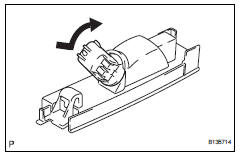
- Install the bulb to the socket.
- Insert the bulb/socket unit into the headlight.
- Turn the bulb/socket unit in the direction indicated by the arrow to install it.
Installation
Hint:
- Use the same procedures for the rh and lh sides.
- The procedures listed below are for the lh side.
- Install rear combination light assembly
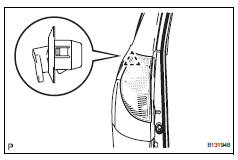
- Attach the clip to install the light.
- Install the 3 nuts and connect the connector.
- Connect cable to negative battery terminal
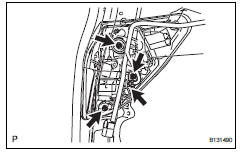
Installation
- Install license plate light assembly
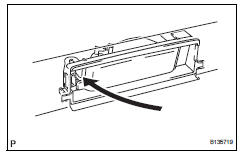
- Install the light as shown in the illustration.
- Install back door lower outside garnish sub-assembly (see page et-61)
- Install back door trim board (see page ed- 66)
- Install back door side garnish rh (see page ed-67)
- Install back door side garnish lh (see page ed-67)
- Install back door center garnish (see page ed-67)
- Connect cable to negative battery terminal
 Rear combination light assembly
Components
Removal
Hint:
Use the same procedures for the rh and lh sides.
The procedures listed below are for the lh side.
Disconnect cable from negative battery
terminal
Cautio ...
 High mounted stop light assembly
Components
Removal
Disconnect cable from negative battery
terminal
Caution:
Wait at least 90 seconds after disconnecting the
cable from the negative (-) battery terminal to
prevent ai ...
Other materials:
Back-up power source circuit
Description
This is the back-up power source circuit for the air conditioning amplifier.
Power is supplied even when the
ignition switch is turned off and is used for functions such as the diagnostic
trouble code memory.
wiring diagram
Inspection procedure
Inspect fuse (ecu-b2)
...
Short to b+ in can bus line
Description
There may be a short circuit between the can bus line and +b when there is
resistance between
terminals 6 (canh) and 16 (bat) or terminals 14 (canl) and 16 (bat) of the dlc3.
Wiring diagram
Inspection procedure
Notice:
Turn the ignition switch off before measuring ...
Operating HomeLink
Press the appropriate
HomeLink button. The
HomeLink indicator light
should turn on.
The status of the opening and
closing of a garage door is
shown by the garage door operation
indicators.
Vehicles with auto anti-glare
inside rear view mirror
Opening
Closing
Vehicles with Digital Rearview
Mirr ...
