
Toyota RAV4 (XA40) 2013-2018 Service Manual: Problem symptoms table
Hint:
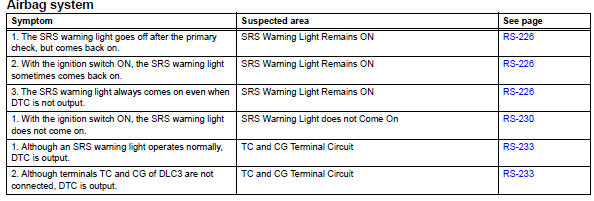
- Use the table below to help determine the cause of the problem symptom. The potential causes of the symptoms are listed in order of probability in the "suspected area" column of the table. Check each symptom by checking the suspected areas in the order they are listed. Replace parts as necessary.
- Proceed to the troubleshooting procedures for each circuit in the table below.
 How to proceed with troubleshooting
Hint:
Use these procedures to troubleshoot the supplemental
restraint system.
*: Use the intelligent tester.
Vehicle brought to workshop
Inspect battery voltage*
Standard volt ...
 Terminals of ecu
Center airbag sensor assembly (w/ curtain
shield airbag)
Center airbag sensor assembly (w/o curtain
shield airbag)
...
Other materials:
Inspection
Inspect cylinder head for warpage
Using a precision straightedge and feeler gauge,
measure the warpage of the contact surfaces of the
cylinder block and manifolds.
Maximum warpage:
0.08 Mm (0.0032 In.)
If the warpage is greater than the maximum, replace
the cylinder head sub-a ...
Slip indicator light does not come on
Description
Refer to the description of "slip indicator light remains on" (see page
bc-152).
Wiring diagram
Refer to the slip indicator light circuit (see page bc-152).
Inspection procedure
Notice:
When replacing the abs and traction actuator, perform the zero point
calibration ( ...
Valve body assembly
Components
Removal
Disconnect cable from negative battery
terminal
Caution:
Wait at least 90 seconds after disconnecting the
cable from the negative (-) battery terminal to
prevent airbag and seat belt pretensioner activation.
Remove no. 1 Engine under cover
Drain automati ...
