
Toyota RAV4 (XA40) 2013-2018 Service Manual: Oil filter
Components
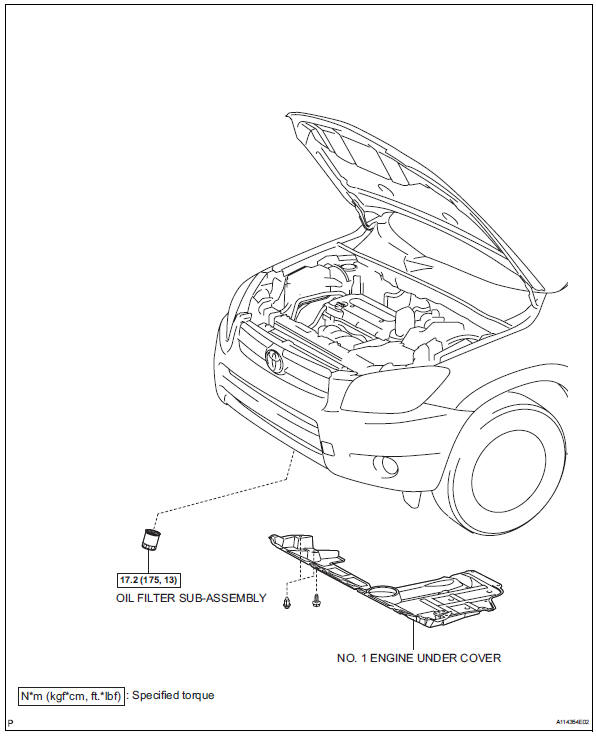
Replacement
Caution:
- Prolonged and repeated contact with engine oil will cause the loss of natural oils from the skin, leading to dryness, irritation and dermatitis. In addition, used engine oil contains potentially harmful contaminants which may cause skin cancer.
- Precautions should be taken when replacing engine oil to minimize the risk of your skin making contact with used engine oil. Wear protective clothing and gloves. Wash your skin thoroughly with soap and water, or use a waterless hand cleaner to remove any used engine oil. Do not use gasoline, thinners or solvents.
- For environmental protection, used oil and used oil filters must be disposed of at designated disposal sites.
- Remove no. 1 Engine under cover
- Drain engine oil
- Remove the oil filler cap.
- Remove the oil drain plug and drain the oil into a container.
- Remove oil filter sub-assembly
- Using sst, remove the oil filter.
Sst 09228-06501
- Install oil filter sub-assembly
- Check and clean the oil filter installation surface.
- Apply clean engine oil to the gasket of a new oil filter.
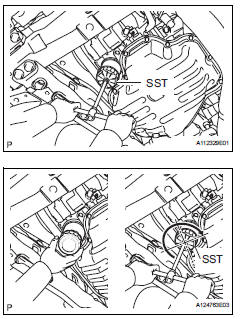
- Lightly screw the oil filter into place by hand. Tighten it until the gasket contacts the seat.
- Using sst, tighten the oil filter.
Sst 09228-06501
Depending on the work space available, choose from the following.
1. If enough space is available, use a torque wrench to tighten the oil filter.
Torque: 17.2 N*m (175 kgf*cm, 13 ft.*Lbf) 2. If enough space is not available to use a torque wrench, tighten the oil filter a 3/4 turn by hand or use a common wrench.
- Add engine oil
- Clean and install the oil drain plug with a new gasket.
Torque: 40 n*m (408 kgf*cm, 30 ft.*Lbf)
- Add new oil.
Standard capacity 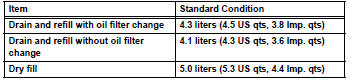
- Install the oil filler cap.
- Check for engine oil leaks
- Install no. 1 Engine under cover
 Lubrication system
On-vehicle inspection
Check engine oil level
Warm up the engine, stop the engine and wait for 5
minutes.
Check that the engine oil level is between the l and
f marks of the oil dipstic ...
 Oil pump
Components
Removal
Remove chain sub-assembly
Remove the chain (see page em-22).
Remove oil pump assembly
Remove the 3 bolts, oil pump and gasket.
...
Other materials:
Cruise control system cruise control main switch
Components
Removal
Caution:
Be sure to read the precautionary notices concerning the
srs airbag system before servicing it (see page rs-1).
Disconnect cable from negative battery
terminal
Caution:
Wait at least 90 seconds after disconnecting the
cable from the negative (-) batt ...
Outer mirror switch
Inspection
Inspect outer mirror switch assembly
The l position of the left/right adjustment switch:
measure the resistance of the mirror switch.
Standard resistance (for left side)
If the result is not as specified, replace the switch
assembly.
The r position of the left/r ...
Front airbag sensor rh circuit malfunction
Description
The front airbag sensor rh consists of the diagnostic circuit, the frontal
deceleration sensor, etc.
If the center airbag sensor assembly receives signals from the frontal
deceleration sensor, it determines
whether or not the srs should be activated.
Dtc b1610/13 is recor ...
