
Toyota RAV4 (XA40) 2013-2018 Service Manual: Precaution
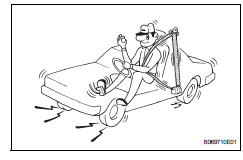
Caution:
Replace the faulty parts of the seat belt systems (outer belt, inner belt, bolts, nuts, adjustable shoulder anchor, tether anchor hardware and other related parts). When inspecting a vehicle that was in a collision, be sure to check all of the seat belt systems regardless of whether or not the system was activated in the collision. Replace any damaged or malfunctioning systems.
- Running test (in safe area)
Caution:
Conduct this test in a safe area.
- Fasten the front seat belt.
- Drive the vehicle at 16 km/h (10 mph) and firmly
depress the brakes. Check that the belts lock and
cannot be extended at this time.
If a belt does not lock, replace the seat belt assembly (see page sb-27).
Hint:
Inspect a seat belt assembly before installing it (see page sb-29).
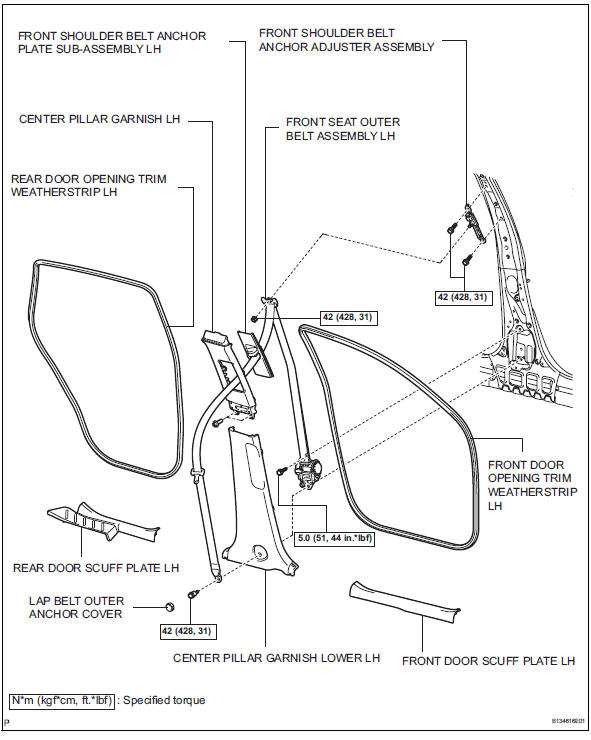
Components

 Removal
Hint:
Use the same procedures for the lh side and rh side.
The procedures listed below are for the lh side.
Disconnect cable from negative battery
terminal
Caution:
Wait at least 90 ...
Other materials:
Rear door courtesy switch
Components
Removal
Hint:
Use the same procedures for the rh and lh sides.
The procedures listed below are for the lh side.
Disconnect cable from negative battery
terminal
Caution:
Wait at least 90 seconds after disconnecting the
cable from the negative (-) battery terminal t ...
On-vehicle inspection
Check ignition coil assembly and perform spark test
Notice:
in this section, the terms "cold" and "hot" refer to
the temperature of the coils. "Cold" means
approximately -10 to 50°c (14 to 122°f). "Hot" means
approximately 50 to 100°c (122 to 212 ...
Seat heaters
Turns on the front left seat
heater (high)
Turns on the front left seat
heater (low)
Turns on the front right seat
heater (high)
Turns on the front right seat
heater (low)
The indicator light comes on.
The seat heaters can be used when
Vehicles without a smart key system
T ...
