
Toyota RAV4 (XA40) 2013-2018 Service Manual: Problem symptoms table (2005/11-2006/01)
Hint:
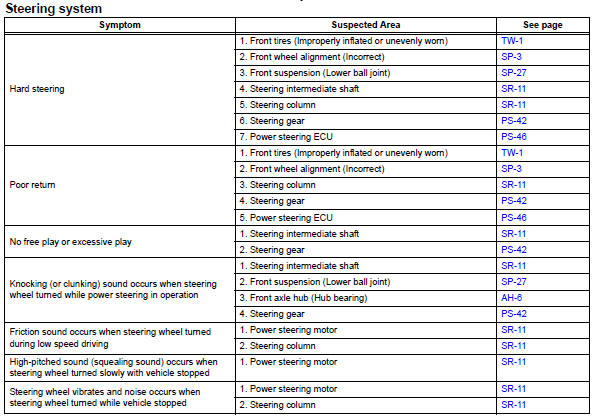
Use the table below to help determine the cause of the problem symptom. The potential causes of the symptoms are listed in order of probability in the "suspected area" column of the table. Check each symptom by checking the suspected areas in the order they are listed. Replace parts as necessary.
 Precaution
Handling precautions for srs airbag
system
Handling precautions for srs airbag system (see
page rs-1).
Handling precautions for steering
column
When handling the steering co ...
 Problem symptoms table (2006/01- )
Hint:
Use the table below to help determine the cause of the
problem symptom. The potential causes of the symptoms are
listed in order of probability in the "suspected area" column
of th ...
Other materials:
Disassembly
Caution:
Wear protective gloves. Sharp areas on the seat frame
(with adjuster) may injure your hands.
Hint:
Use the same procedures for the rh side and lh side.
The procedures listed below are for the lh side.
Remove vertical adjuster cover lh (for driver side)
Using a screw ...
General maintenance (2005/11-2006/01)
Inspect steering linkage and gear housing
Check the steering wheel free play.
Check the steering linkage for looseness or
damage.
Check that the tie rod ends do not have
excessive play
Check that the dust seals and boots are not
damaged.
Check that the boot clamps are not ...
Meter control switches
: Change the screen
and move the cursor
: Change displayed
content and scroll up/down the screen
Press: Enter/Set
Press and hold: Reset/Display
customizable items/Display
the cursor
Move the main meter and
return to the previous screen
Call sending/receiving and
history display
Link ...
