
Toyota RAV4 (XA40) 2013-2018 Service Manual: Removal
- Remove package tray trim pocket subassembly (w/o rear no. 2 Seat)
- Remove tonneau cover assembly (w/o rear no. 2 Seat)
- Remove rear floor no. 1 Board (w/o rear no.
2 Seat)
- Remove deck board assembly (w/o rear no. 2 Seat)
- Remove rear floor no. 3 Board (w/o rear no.
2 Seat)
- Remove rear floor no. 2 Board (w/o rear no.
2 Seat)
- Remove rear floor no. 1 Mat support side plate (w/o rear no. 2 Seat) (see page ir-31)
- Remove back door weatherstrip (w/o rear no. 2 Seat)
- Remove rear floor finish plate (w/o rear no.
2 Seat) (see page ir-31)
- Remove reclining remote control lever bezel lh (w/o rear no. 2 Seat)
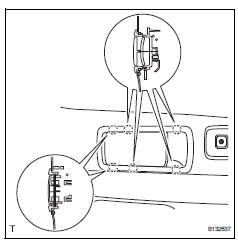
- Using a screwdriver, detach the 6 claws and remove the bezel.
Hint:
Tape the screwdriver tip before use.
- Remove tether anchor bracket subassembly (w/o rear no. 2 Seat) (see page ir-32)
- Remove deck trim side panel assembly lh (w/o rear no. 2 Seat) (see page ir-32)
- Remove reclining remote control lever sub-assembly lh (w/o rear no. 2 Seat)
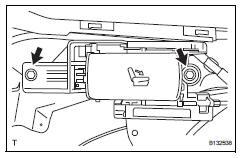
- Remove the 2 bolts and lever.
- Disconnect the rear no. 1 Seat lock cable from the lever.
- Remove rear no. 5 Seat leg side cover
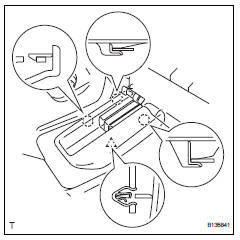
- Using a screwdriver, detach the 3 claws and clip, and remove the side cover.
Hint:
Tape the screwdriver tip before use.
- Remove rear no. 4 Seat leg side cover (w/ rear no. 2 Seat)
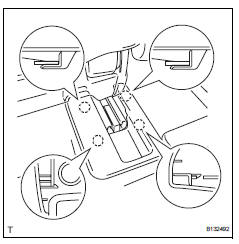
- Using a screwdriver, detach the 4 claws and remove the side cover.
Hint:
Tape the screwdriver tip before use.
- Remove rear no. 4 Seat leg side cover (w/o rear no. 2 Seat)
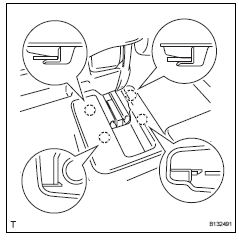
- Using a screwdriver, detach the 4 claws and remove the side cover.
Hint:
Tape the screwdriver tip before use.
- Remove rear no. 3 Seat leg side cover (w/ rear no. 2 Seat)
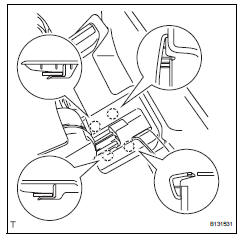
- Using a screwdriver, detach the 4 claws and remove the side cover.
Hint:
Tape the screwdriver tip before use.
- Remove rear no. 3 Seat leg side cover (w/o rear no. 2 Seat)
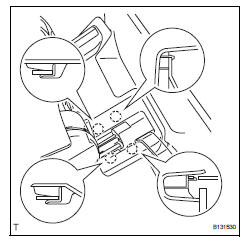
- Using a screwdriver, detach the 4 claws and remove the side cover.
Hint:
Tape the screwdriver tip before use.
- Remove rear seat leg cover
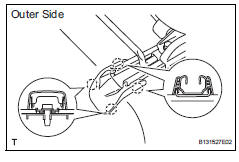
- Using a screwdriver, detach the 8 claws and remove the 2 leg covers.
Hint:
Tape the screwdriver tip before use.
- Remove rear seat lap type belt assembly center rh (w/ rear no. 2 Seat) (see page sb-39)
- Remove rear seat lap type belt assembly center rh (w/o rear no. 2 Seat) (see page sb-39)
- Remove rear no. 1 Seat lock cable assembly (w/o rear no. 2 Seat)
- Disconnect the lock cable from the seat.
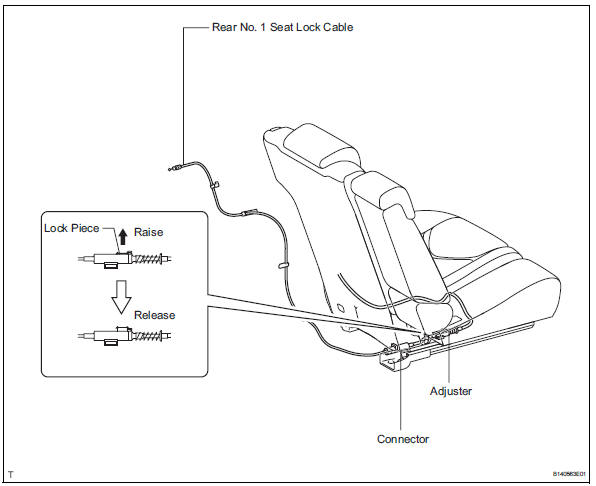
- Raise the adjuster's lock piece to release the lock.
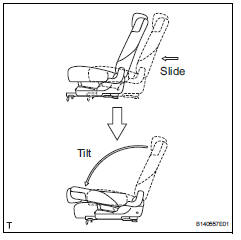
- Slide the seat forward and tilt the seatback forward.
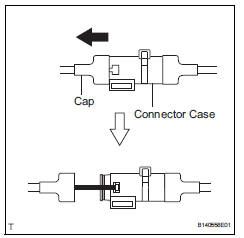
- Remove the seat's cap from the connector case.
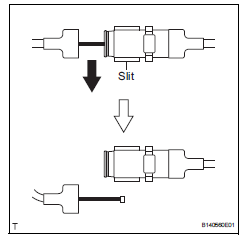
- Pull the seat's cap toward the outside of the vehicle. Then remove the cable from the connector case's slit.
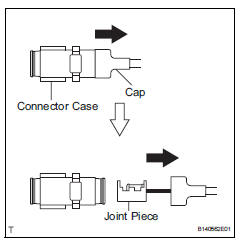
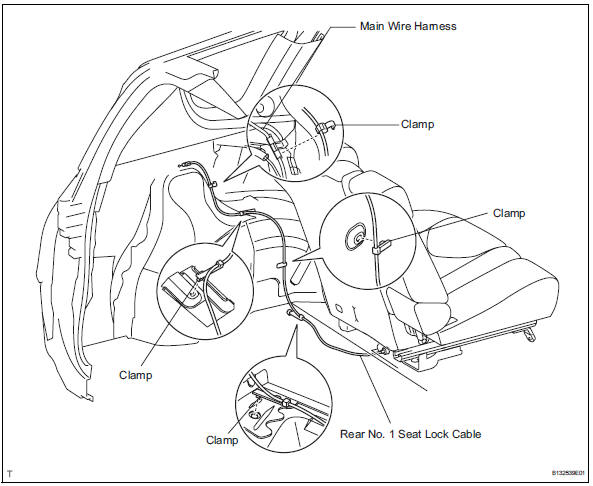
- Remove the body's cap from the connector case.
- Detach the clamps and remove the lock cable.
- Remove rear no. 1 Seat assembly lh
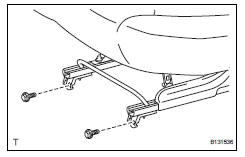
- Lift up the seat track adjusting handle and move the seat to the rearmost position.
- Remove the 2 bolts on the front side of the seat.
- Lift up the seat track adjusting handle and move the seat to the foremost position.
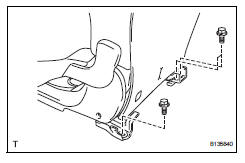
- Remove the 3 bolts on the rear side of the seat.
- Fully tilt the seatback forward. Then remove the seat.
Notice:
Be careful not to damage the vehicle body,
 Rear no. 1 Seat assembly (for lh side)
Components
...
 Disassembly
Caution:
Wear protective gloves. Sharp areas on the seatback
frame, seat cushion frame and reclining adjuster may
injure your hands.
Remove rear seat headrest assembly
Remove rear seat center ...
Other materials:
Transmission range sensor circuit malfunction (prndl input)
Description
The park/neutral position (pnp) switch detects the shift lever position and
sends signals to the ecm.
Monitor description
These dtcs indicate a problem with the park/neutral position switch and the
wire harness in the park/
neutral position switch circuit.
The park/neu ...
Seat belt pretensioners (front seats)
The pretensioners help the seat
belts to quickly restrain the occupants
by retracting the seat belts
when the vehicle is subjected to
certain types of severe frontal or
side collision or a vehicle rollover.
The pretensioners do not activate
in the event of a minor frontal
impact, a minor ...
Throttle actuator control system
Description
The throttle actuator is operated by the ecm, and opens and closes the
throttle valve using gears. The
opening angle of the throttle valve is detected by the throttle position (tp)
sensor, which is mounted on
the throttle body. The tp sensor provides feedback to the ecm in ord ...
