
Toyota RAV4 (XA40) 2013-2018 Service Manual: Removal
Hint:
- Use the same procedures for the rh side and lh side.
- The procedures listed below are for the lh side.
Caution:
Be sure to read the precautionary notices concerning the srs airbag system before servicing it (see page rs-1).
- Disconnect cable from negative battery terminal
Caution:
Wait at least 90 seconds after disconnecting the cable from the negative (-) battery terminal to prevent airbag and seat belt pretensioner activation.
- Remove roof headlining assembly (see page ir-37)
- Remove curtain shield airbag assembly lh
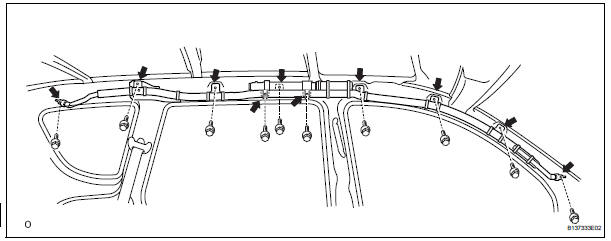
- Disconnect the connector.
Notice:
When handling the airbag connector, take care not to damage the airbag wire harness.
- Remove the 10 bolts and curtain shield airbag.
- Remove roof side rail bracket lh
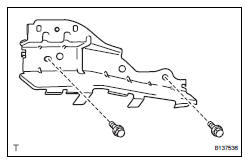
- Remove the 2 bolts and bracket.
 Curtain shield airbag assembly
Components
On-vehicle inspection
Check curtain shield airbag assembly (vehicle not involved in
collision)
Perform a diagnostic system check (see page rs-
49).
With the curtai ...
 Installation
Caution:
Be sure to read the precautionary notices concerning the
srs airbag system before servicing it (see page rs-1).
Install roof side rail bracket lh
Install the bracket with the ...
Other materials:
Maintenance requirements
To ensure safe and economical
driving, day-to-day care
and regular maintenance
are essential. It is the
owner's responsibility to
perform regular checks.
Toyota recommends the following
maintenance:
â– Repair and replacement
It is recommended that genuine
Toyota parts be used for repairs to
ensure ...
For your information
Main owner’s manual
Please note that this manual applies to all models and all equipment,
including
options. Therefore, you may find some explanations for equipment not
installed on your vehicle.
All specifications provided in this manual are current at the time of printing.
However, be ...
Bluetooth® phone
settings
You can adjust the hands-free system to your desired settings.
“Phone/message settings� screen
To display the screen shown below, press the “setup� button, and
select “phone� on the “setup� screen.
Set the phone connection
Setting the sound
Contact/call history settings
...
