
Toyota RAV4 (XA40) 2013-2018 Service Manual: Removal
Hint:
- Use the same procedures for the rh side and lh side.
- The procedures listed below are for the lh side.
- Remove rear wheel
- Remove rear stabilizer link assembly lh
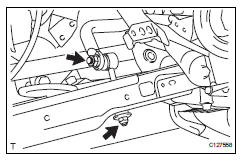
- Remove the nut and disconnect the link from the suspension no. 2 Arm.
- Remove the nut and link from the stabilizer bar.
- Remove rear stabilizer link assembly rh
Hint:
Use the same procedures described for the lh side
- Remove rear no. 2 Suspension arm assembly lh (see page sp-45)
- Remove rear no. 2 Suspension arm assembly rh
Hint:
Use the same procedures described for the lh side
- Remove rear coil spring insulator upper lh (see page sp-33)
- Remove rear coil spring lh (see page sp-33)
- Remove rear coil spring insulator lower lh (see page sp-33)
- Remove rear coil spring insulator upper rh
Hint:
Use the same procedures described for the lh side
- Remove rear coil spring rh
Hint:
Use the same procedures described for the lh side
- Remove rear coil spring insulator lower rh
Hint:
Use the same procedures described for the lh side
- Remove rear no. 1 Stabilizer bar bracket
- Remove the 2 nuts and bracket.
Hint:
Use the same procedures for the other side.
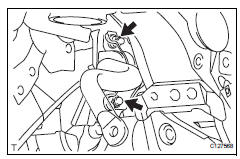
- Remove rear stabilizer bar
- Remove the stabilizer bar from the vehicle.
Notice:
When removing the stabilizer bar from the vehicle, make sure not to damage the sensor wire, brake hose, etc.
- Remove rear stabilizer bush
- Remove the 2 stabilizer bushes from the stabilizer bar.
 Suspension & axle rear stabilizer bar
Components
...
 Inspection
Inspect rear stabilizer link assembly lh
As shown in the illustration, move the ball joint stud
back and forth 5 times before installing the nut.
Using a torque wrench, turn the nut c ...
Other materials:
Contact/call history
settings
The contact can be transferred from a bluetooth® phone to the system.
The contact also can be added, edited and deleted.
The call history can be deleted and contact and favorites can be
changed.
Display the “phone/message settings� screen.
Select “contact/call history settings� ...
Data list / active tes
Read data list
Hint:
Using the intelligent tester's data list allows switch,
sensor, actuator and other item values to be read without
removing any parts. Reading the data list early in
troubleshooting is one way to save time.
Connect the intelligent tester (with can vim) to the
dlc3 ...
Check mode procedure
Check mode (signal check)
Connect the intelligent tester (with can vim) to the
dlc3.
Turn the ignition switch on.
Select the "signal check", and continue
checking with the intelligent tester.
Notice:
Select the "signal check" from the "dtc
check&quo ...
