
Toyota RAV4 (XA40) 2013-2018 Service Manual: Removal
- Drain differential oil
- Remove rear wheel
- Remove tailpipe assembly
- Remove the tailpipe (see page ex-2).
- Remove center exhaust pipe assembly
- Remove the center pipe (see page ex-2).
- Remove propeller with center bearing shaft assembly (see page pr-3)
- Remove rear suspension member brace lh
- Remove the 2 bolts and brace from the suspension member.
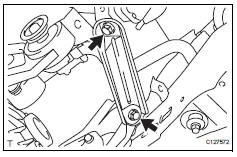
- Remove rear suspension member brace r
h
Hint:
Use the same procedures described for the lh side.
- Remove rear differential carrier subassembly
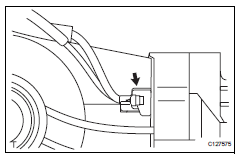
- Disconnect the harness clamp.
- Remove the breather tube.
- Disconnect the connector.
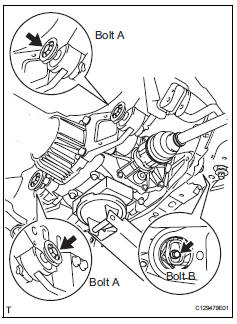
- Support the rear differential carrier with a transmission jack or equivalent.
- Fix the nuts in place and remove bolt a, bolt b and bolt c.
Notice:
Do not loosen the nuts. Loosen the bolts.
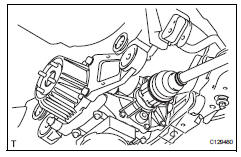
- Slowly lower the jack and then tilt the rear differential carrier.
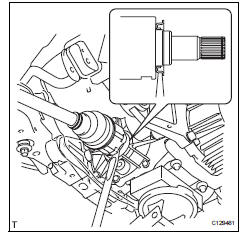
- Set the tip of the tire lever to the position on the rear
drive shaft inboard joint shown in the illustration.
Then, using the ribbed part of the rear differential carrier as a fulcrum, disconnect the left and right rear drive shafts.
Notice:
Do not scratch the rear drive shaft dust cover.
- Remove rear differential no. 1 And no. 2 Support
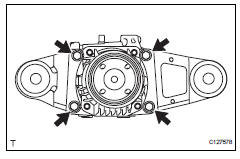
- Remove the 4 bolts and differential no. 1 And no. 2 Supports from the differential carrier.
- Remove rear differential support
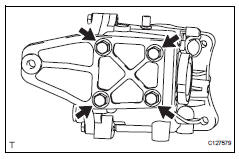
- Remove the 4 bolts and differential support from the differential carrier.
 Rear differential carrier assembly
Components
...
 Disassembly
Fix differential carrier sub-assembly
Fix the rear differential carrier in place with the
overhaul attachment.
Remove stud bolt
Remove the 4 stud bolts from the transmission
c ...
Other materials:
Front power seat lumbar switch
Inspection
Inspect front power seat lumbar switch lh
Measure the resistance between the terminals when
the switch is operated.
Standard resistance
If the result is not as specified, replace the switch. ...
Inspection
Inspect rear stabilizer link assembly lh
As shown in the illustration, move the ball joint stud
back and forth 5 times before installing the nut.
Using a torque wrench, turn the nut continuously at
a rate of 3 to 5 seconds per turn and take the torque
reading on the fifth turn.
...
Refueling
Opening the fuel tank cap
Perform the following steps
to open the fuel tank cap:
Before refueling the vehicle
Close all the doors and windows,
and turn the engine
switch to OFF.
Confirm the type of fuel.
â– Fuel tank opening for unleaded
gasoline
To help prevent incorrect fueling,
your vehicle ...
