
Toyota RAV4 (XA40) 2013-2018 Service Manual: Seat heater switch
Components
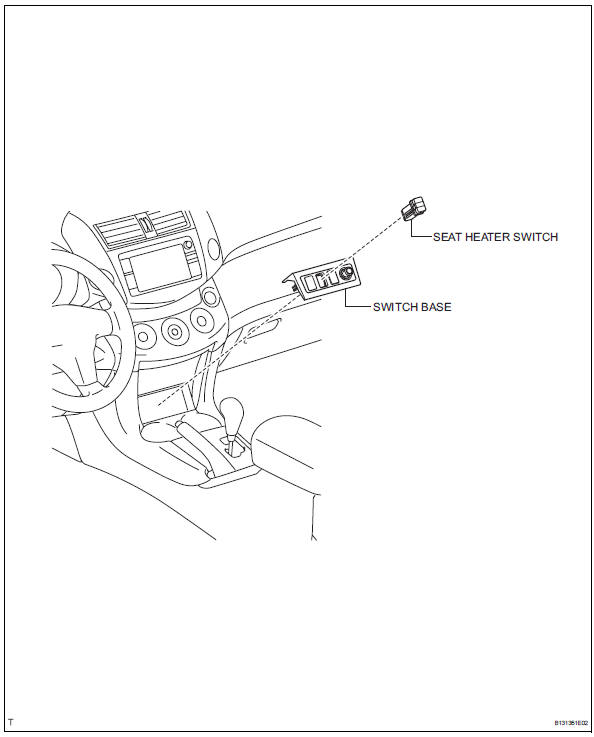
Removal
- Disconnect cable from negative battery terminal
Caution:
Wait at least 90 seconds after disconnecting the cable from the negative (-) battery terminal to prevent airbag and seat belt pretensioner activation.
- Remove switch base (see page ip-18)
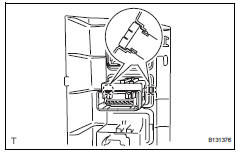
- Remove seat heater switch
- Using a screwdriver, detach the 2 claws and remove the switch.
Hint:
Tape the screwdriver tip before use.
Inspection
- Inspect seat heater switch
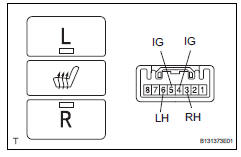
- Measure the resistance of the seat heater switch when the switch is operated.
Standard resistance
For lh
For rh 
If the result is not as specified, replace the switch.
- Check that the seat heater switch indicator light illuminates when the switch is operated.
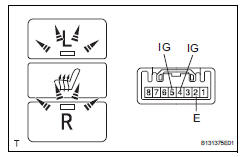
Ok
For lh 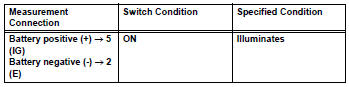
For rh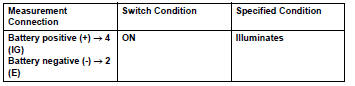
If the result is not as specified, replace the switch.
- Check that the seat heater switch illuminates.
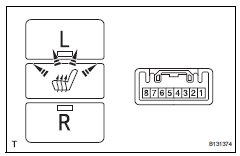
Ok
If the result is not as specified, replace the switch
Installation
- Install seat heater switch
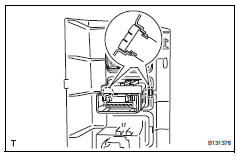
- Attach the 2 claws to install the switch.
- Install switch base (see page ip-27)
- Connect cable to negative battery terminal
 Lumbar support adjuster assembly
Inspection
Inspect lumbar support adjuster assembl
Check operation of the lumbar support adjuster.
Check if the lumbar support adjuster moves
smoothly when the battery is connect ...
 Front seatback heater
Inspection
Inspect front seatback heater assembly
lh
Measure the resistance of the seatback heater.
Standard resistance
If the result is not as specified, replace the seatback
he ...
Other materials:
Front suspension lower no. 1 Arm
Components
Removal
Remove front wheel
Remove hood sub-assembly
Remove the hood (see page ed-4).
Suspend engine assembly
Install the no. 1 And no. 2 Engine hangers with the
bolts as shown in the illustration.
Torque: 38 n*m (387 kgf*cm, 28 ft.*Lbf)
parts no.
...
Inspection
Inspect no. 1 Chain tensioner
Check that the plunger moves smoothly when the
ratchet pawl is raised with your finger.
Release the ratchet pawl, then check that the
plunger is locked in place by the ratchet pawl and
does not move when pushed with your finger.
Inspect chain ...
List screen operation
When a list screen is displayed, use the appropriate buttons to
scroll through the list.
How to scroll
Select to scroll to the next
or previous page.
Appears to the right of
titles, the complete titles are
too long for the display. Select
this button to scroll the title.
Turn th ...
