
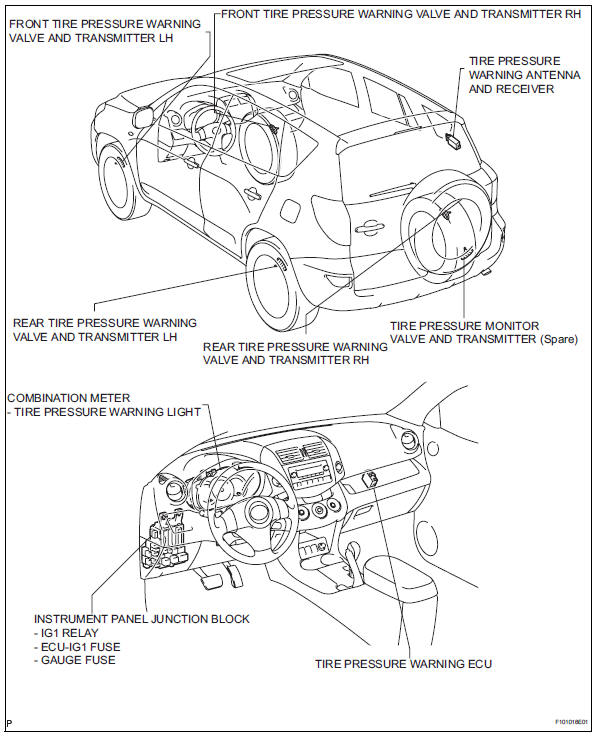
Toyota RAV4 (XA40) 2013-2018 Service Manual: Parts location
Toyota RAV4 (XA40) 2013-2018 Service Manual / Tire and wheel / Tire pressure warning system / Parts location
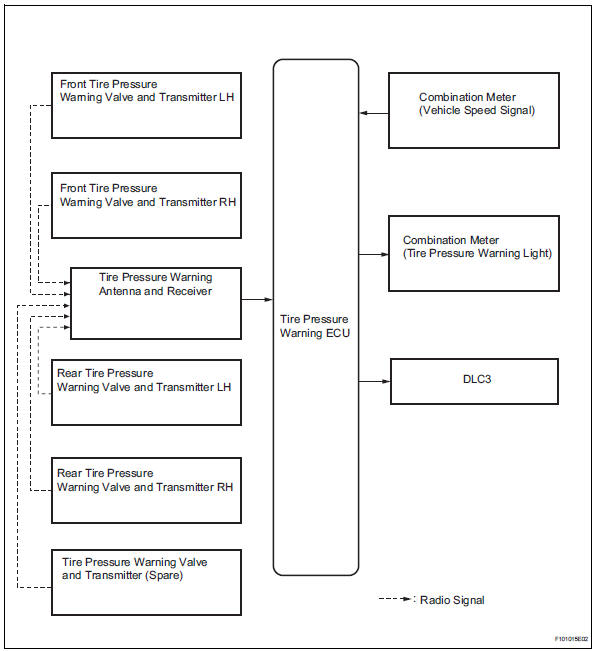
System diagram
 Precaution
Tire pressure warning system precaution
When the tire pressure warning light turns on,
immediately check the tire pressure of the tire and
adjust it to the specified value. (When the ...
 System description
Description of system
A tire pressure warning antenna and receiver is
equipped with a tire pressure sensor and a
transmitter and is installed in each tire wheel. The
sensor measures the ...
Other materials:
Parts location
System diagram
...
Digital Rear-view Mirror
The Digital Rear-view Mirror
is a system that uses the
camera on the rear of the
vehicle and displays its
image on the display of the
Digital Rear-view Mirror.
The Digital Rear-view Mirror
can be changed between
optical mirror mode and digital
mirror mode by operating
the lever.
The Digital Rear-v ...
Replacement
Replace generator drive end frame bearing
Remove the 4 screws and bearing retainer.
Using sst and a hammer, tap out the bearing.
Sst 09950-60010 (09951-00250), 09950-70010
(09951-07100)
Using sst and a press, press in a new bearing.
Sst 09950-60010 (09951-00250), 09 ...
В© 2011-2026 Copyright www.trav4.net
