
Toyota RAV4 (XA40) 2013-2018 Service Manual: Cooling fan relay
On-vehicle inspection
- Disconnect cable from negative battery terminal
Caution:
Wait at least 90 seconds after disconnecting the cable from the negative (-) battery terminal to prevent airbag and seat belt pretensioner activation.
- Remove engine room no. 2 Relay block cover
- Inspect no. 1 Fan relay (marking: fan no. 1)
- Remove the relay from the engine room no. 2 Relay block.
- measure the resistance of the relay.
Standard resistance 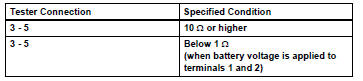
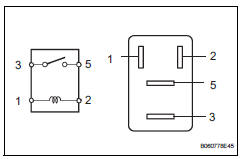
If the result is not as specified, replace the relay.
- Install the relay.
- Inspect no. 2 Fan relay (marking: fan no. 2)
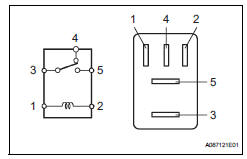
- Remove the relay from the engine room no. 2 Relay block.
- Measure the resistance of the relay.
Standard resistance 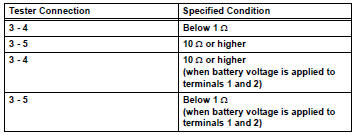
If the result is not as specified, replace the relay.
- Install the relay.
- Inspect no. 3 Fan relay (marking: fan no. 3)
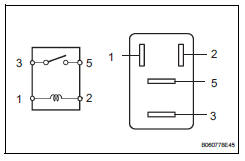
- Remove the relay from the engine room no. 2 Relay block.
- Measure the resistance of the relay.
Standard resistance 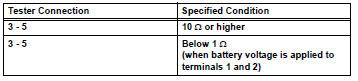
If the result is not as specified, replace the relay.
- Install the relay.
- Install engine room no. 2 Relay block cover
- Connect cable to negative battery terminal
 Cooling fan motor
On-vehicle inspection
Inspect no. 1 Cooling fan motor
Disconnect the no. 1 Fan connector.
Connect the battery and ammeter to the no. 1 Fan
motor connector.
Check th ...
 Radiator
Components
On-vehicle inspection
Check radiator reservoir cap subassembly
Measure the valve opening pressure.
If there are water stains or foreign matter on oring
...
Other materials:
Installation
Install ecm
Install the 2 brackets to the ecm with the 4 screws.
Torque: 3.0 N*m (30 kgf*cm, 27 in.*Lbf)
Connect the 2 ecm connectors.
Notice:
When connecting the connector, make sure that
dirt, water and other foreign matter does not
become stuck between the connector and ...
Blower resistor
On-vehicle inspection
Inspect blower motor control
Measure the resistance of the blower resistor.
Standard resistance
If the resistance is not as specified, replace the
blower motor control. ...
Installation
Install drive plate sub-assembly
Clean the 8 bolts and 8 bolt holes.
Apply adhesive to 2 or 3 threads of the 8 bolts.
Adhesive:
Toyota genuine adhesive 1342, three bond
1342 or equivalent
Using sst, hold the crankshaft.
Sst 09213-54015 (91651-60855), 09330-00021
Instal ...
