
Toyota RAV4 (XA40) 2013-2018 Service Manual: Data list / active tes
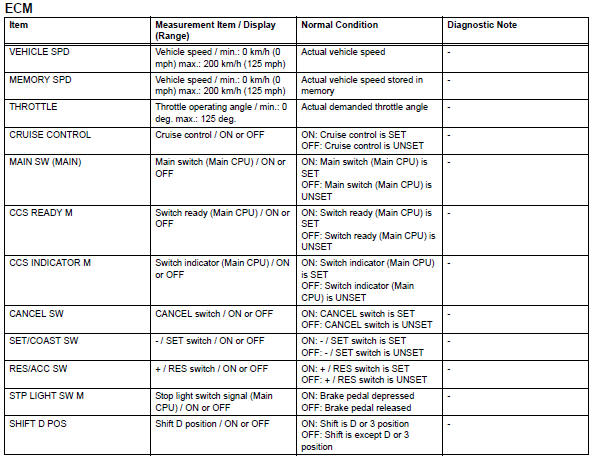
- Read data list
Hint:
Using the intelligent tester's data list allows switch, sensor, actuator and other item values to be read without removing any parts. Reading the data list early in troubleshooting is one way to save time.
- Connect the intelligent tester (with can vim) to the dlc3.
- Turn the ignition switch on.
- Read the data list according to the display on the tester.
 Fail-safe chart
Hint:
If the following conditions are detected while the cruise
control is in operation, the system clears the stored vehicle
speed in the ecm and cancels the cruise control operation.
Hint:
...
 Diagnostic trouble code chart
Hint:
If a trouble code is displayed during the dtc check, check
the trouble areas listed for that code in the table below and
proceed to the appropriate page.
...
Other materials:
Installation
Install upper instrument panel
Attach the 6 clips and 5 claws to install the
instrument panel.
Connect the connectors and clamps.
Install the 2 bolts and 2 screws.
Connect the passenger airbag connector.
Install the 2 bolts to the passenger airbag.
Torque: 20 n*m (204 k ...
Shift position purpose
*1: Shifting the shift lever to d allows the system to select a gear suitable
for
the driving conditions.
Setting the shift lever to d is recommended for normal driving.
*2: Selecting shift ranges using s mode restricts the upper limit of the
possible
gear ranges, controls engine bra ...
Fuel consumption information
The fuel consumption information can be displayed on entune
premium audio with navigation and entune audio screen.
Display the trip information or past record screen
Vehicles with entune audio
Press the “car� button.
Vehicles with entune premium audio with navigation and entune
au ...
