
Toyota RAV4 (XA40) 2013-2018 Service Manual: Data list / active test (2005/11-2006/01)
- Read data list
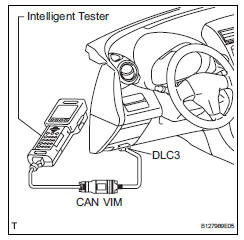
- Read data list
Hint:
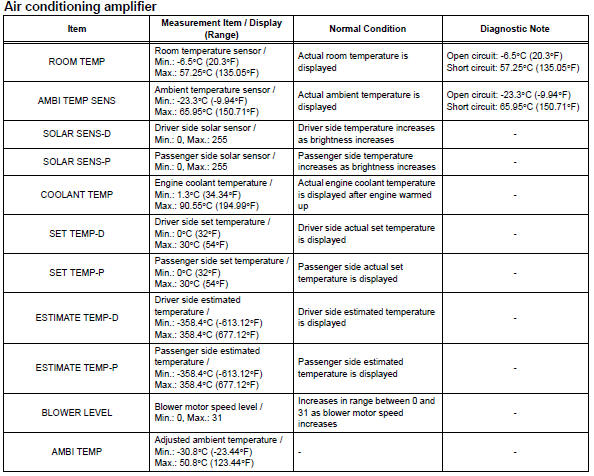
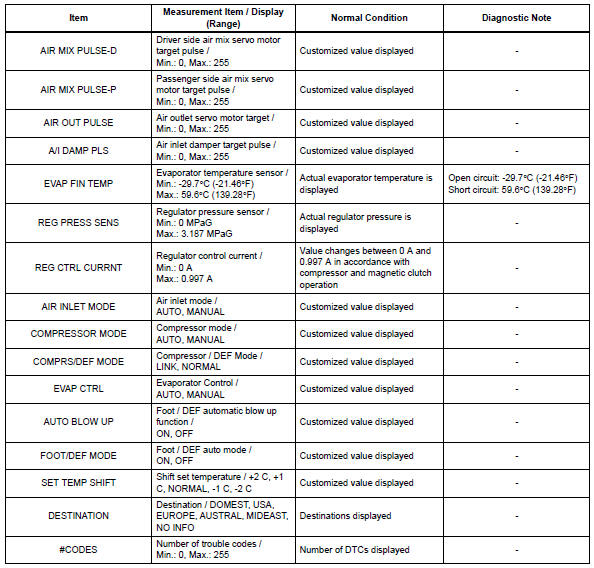
Using the intelligent tester's data list allows switch, sensor, actuator and other item values to be read without removing any parts. Reading the data list early in troubleshooting is one way to save time.
- Connect the intelligent tester (with can vim) to the dlc3.
- Turn the ignition switch on and turn the intelligent tester on.
- Read the data list by following the prompts on the tester.
- Perform active test
Hint:
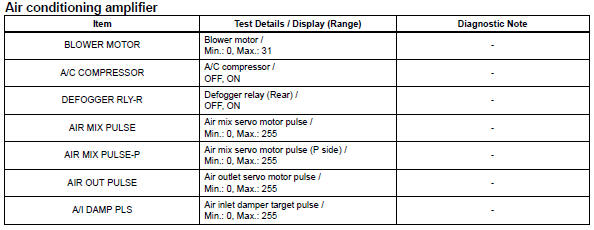
Performing the intelligent tester's active test allows relay, vsv, actuator and other items to be operated without removing any parts. Performing the active test early in troubleshooting is one way to save time.
The data list can be displayed in the active test.
- Connect the intelligent tester (with can vim) to the dlc3.
- Turn the ignition switch on and turn the intelligent tester on.
- Perform the active test by following the prompts on the tester.
 Check mode procedure
Panel diagnosis (indicator check)
Turn the ignition switch to lock.
Turn the ignition switch on while simultaneously
pressing the a/c control auto switch and the rec/
frs switch.
Chec ...
 Data list / active test (2006/01- )
Read data list
Hint:
Using the intelligent tester's data list allows switch,
sensor, actuator and other item values to be read without
removing any parts. Reading the data list early in
...
Other materials:
Optimal use of the audio system
Displays the “setup� menu
Changes the following settings
Sound quality and volume
balance
The sound quality and balance
setting can be changed to produce
the best sound.
Automatic sound levelizer
Language
Selecting the mode
Using the audio control function
C ...
Removal
Remove radiator support opening cover
Remove front wheel rh
Remove front fender apron rh
Remove front suspension member
reinforcement rh
Remove the 4 bolts and reinforcement rh.
Remove fan and generator v belt
Using sst and 19 mm socket wrench, loosen the vribbed
belt ...
Problem symptoms table
Hint:
Use the table below to help determine the cause of the
problem symptom. The potential causes of the symptoms are
listed in order of probability in the "suspected area" column
of the table. Check each symptom by checking the suspected
areas in the order they are listed. Replace p ...
