
Toyota RAV4 (XA40) 2013-2018 Service Manual: How to proceed with troubleshooting
Hint:
Perform troubleshooting in accordance with the following flowchart.
*: Use the intelligent tester.
- Vehicle brought to workshop

- Inspect battery voltage
Standard voltage: 11 to 14 v
If the voltage is below 11 v, recharge or replace the battery before proceeding.

- Problem symptom confirmation

- Check can communication system*
- Check for dtc (see page ps-11).
Result 
Hint:
- When any can communication system dtcs are output, perform troubleshooting on the can communication system first.
- When communication to the power steering ecu is not established through the intelligent tester, inspect terminals sil of the dlc3 and the power steering ecu, and the ig circuit of the power steering ecu.


- Check dtc*
- Check for dtc (see page ps-11).
Result 


- Problem symptoms table
Result 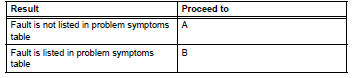


- Overall analysis and troubleshooting*
- Terminals of ecu (see page ps-8).
- Data list / active test (see page ps-14).

- Repair or replace

- Confirmation test

End
 System description
Description
The eps (electronic power steering) system generates
torque through the operation of the motor and the
reduction gear installed on the column shaft in order to
assist steering eff ...
 Problem symptoms table
Hint:
Use the table below to help determine the cause of the
problem symptom. The potential causes of the symptoms are
listed in order of probability in the "suspected area" column of
t ...
Other materials:
Registering a bluetooth®
device
Bluetooth® compatible phones (hfp) and portable audio players
(avp) can be registered simultaneously. You can register up to 5
bluetooth® devices.
How to register a bluetooth® device
Display the “bluetooth* setup� screen.
*: Bluetooth is a registered trademark of bluetooth sig, inc. ...
Diagnosis system
Description
Engine immobiliser system data and diagnostic
trouble codes (dtcs) can be read through the
vehicle's data link connector 3 (dlc3). In some
cases, a malfunction may be occurring in the engine
immobiliser system even though the security
indicator light is not illuminated ...
Tire pressure warning light circuit
Description
If the tire pressure warning ecu detects trouble, the tire pressure warning
light turns on and tire pressure
monitor is canceled at the same time. At this time, the ecu records a dtc in
memory.
Connect terminals tc and cg of the dlc3 to make the tire pressure warning light
bli ...
