
Toyota RAV4 (XA40) 2013-2018 Service Manual: Problem symptoms table
Hint:
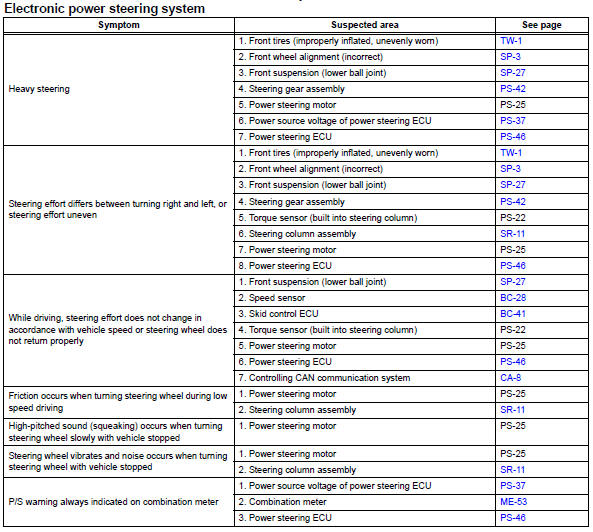
Use the table below to help determine the cause of the problem symptom. The potential causes of the symptoms are listed in order of probability in the "suspected area" column of the table. Check each symptom by checking the suspected areas in the order they are listed. Replace parts as necessary.
 How to proceed with troubleshooting
Hint:
Perform troubleshooting in accordance with the following
flowchart.
*: Use the intelligent tester.
Vehicle brought to workshop
Inspect battery voltage
Standard voltage:
11 ...
 Terminals of ecu
Check power steering ecu
Hint:
Measurements cannot be performed on the c connector
side of the power steering ecu.
Measure the voltage and resistance of the
connectors.
...
Other materials:
Switch failure
Description
This dtc is output when the sliding roof drive gear (sliding roof ecu)
detects that the slide open or
tilt up switch in the overhead junction block is stuck for 30 seconds or more.
Wiring diagram
Refer to dtc b2341 (see page rf-11).
Inspection procedure
Read value of i ...
Installation
Hint:
A bolt without a torque specification is shown in the standard
bolt chart (see page ss-2).
Install front seat inner belt assembly (for power seat)
Install the front seat inner belt assembly with the
nut.
Torque: 42 n*m (428 kgf*cm, 31 ft.*Lbf)
Notice:
Do not overlap the ...
Rear upper control arm
Components
Removal
Hint:
Use the same procedures for the rh side and lh side.
The procedures listed below are for the lh side.
Remove rear wheel
Disconnect skid control sensor wire (for
2wd) (see page bc-198)
Disconnect rear speed sensor lh (for 4wd)
(see page bc-205)
Rem ...
