
Toyota RAV4 (XA40) 2013-2018 Service Manual: Electronic control
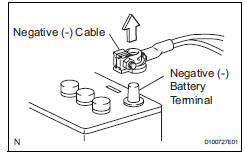
- Removal and installation of battery terminal
Notice:
Certain systems need to be initialized after disconnecting and reconnecting the cable from the negative (-) battery terminal.
- Before performing electronic work, disconnect the cable from the negative (-) battery terminal to prevent component and wire damage caused by accidental short circuits.
- When disconnecting the cable, turn the ignition switch off and headlight dimmer switch off and loosen the cable nut completely. Perform these operations without twisting or prying the cable. Then disconnect the cable.
- Clock settings, radio settings, audio system memory, dtcs and other data are erased when the cable is disconnected from the negative (-) battery terminal. Write down any necessary data before disconnecting the cable.
- Handling of electronic parts
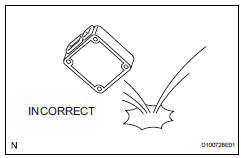
- Do not open the cover or case of the ecu unless absolutely necessary. If the ic terminals are touched, the ic may be rendered inoperative by static electricity.
- Do not pull the wires when disconnecting electronic connectors. Pull the connector.
- Be careful not to drop electronic components, such as sensors or relays. If they are dropped on a hard surface, they should be replaced.
- When cleaning the engine with steam, protect the electronic components, air filter and emission-related components from water.
- Never use an impact wrench to remove or install temperature switches or temperature sensors.
- When measuring the resistance of a wire connector, insert the tester probe carefully to prevent terminals from bending.
 For vehicles with supplemental restraint system
The rav4 is equipped with a supplemental restraint
system (srs). The srs of this vehicle consists of the
following:
Steering pad
Front passenger airbag assembly
Front seat side airbag assemb ...
 Removal and installation of fuel control
parts
Removal and installation of fuel control
parts
Place for removing and installing fuel
system parts
Work in a location with good air ventilation that
does not have welders, grinders, drills, electric
motors, stoves, or any other igni ...
Other materials:
Diagnostic trouble code chart
If a dtc is displayed during the dtc check, check the circuit
listed in the table below and proceed to the page given.
Hint:
*1: "Comes on" means the malfunction indicator lamp
(mil) illuminates.
*2: "Dtc stored" means the ecm memorizes the
malfunction code if the ecm ...
Ig power source circuit
Description
This is the main power source supplied to the air conditioning amplifier when
the ignition switch is on.
This power source is used for operating components, such as the air conditioning
amplifier and servo
motors.
Wiring diagram
Inspection procedure
Inspect fuse (ecu-i ...
AHB (Automatic High
Beam)
The Automatic High Beam
uses an in-vehicle front
camera to assess the brightness
of streetlights, the
lights of vehicles ahead etc.,
and automatically turns the
high beams on or off as necessary.
WARNING
â– Limitations of the Automatic
High Beam
Do not overly rely on the Automatic
High Beam. Always ...
