
Toyota RAV4 (XA40) 2013-2018 Service Manual: Evaporator temperatur sensor
Removal
- Remove air conditioning unit
- Remove the air conditioning radiator (see page ac- 185).
- Remove evaporator temperature sensor (see page ac-193)
Inspection
- Inspect evaporator temperature sensor
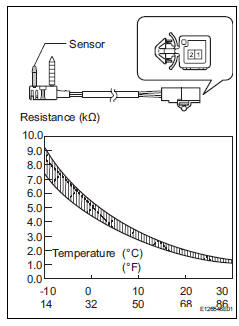
- Measure the resistance of the sensor.
Standard resistance 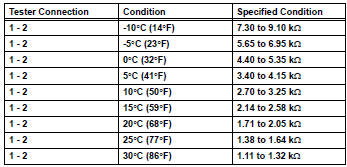
Notice:
- Even slightly touching the sensor may change the resistance value. Be sure to hold the connector of the sensor.
- When measuring, the sensor temperature must be almost the same as the ambient temperature.
Hint:
As the temperature increases, the resistance decreases (see the graph).
If the result is not as specified, replace the sensor.
Installation
- Install evaporator temperature sensor (see page ac-193)
- Install air conditioning unit
- Install the air conditioning unit (see page ac-197).
 Room temperature sensor (for automatic ai conditioning system)
Components
Removal
Remove lower instrument panel
Remove the lower instrument panel (see page ip-
16).
Remove room temperature sensor
Disconnect the duct.
Disconnect ...
 Solar sensor (for automatic air conditioning system)
Components
Removal
Disconnect cable from negative battery
terminal
Caution:
Wait at least 90 seconds after disconnecting the
cable from the negative (-) battery terminal to
prevent ai ...
Other materials:
If your vehicle needs to be
towed
If towing is necessary, we
recommend having your
vehicle towed by your
Toyota dealer or commercial
towing service, using a
wheel-lift type truck or flatbed
truck.
Use a safety chain system
for all towing, and abide by
all state/provincial and local
laws.
Situations when it is necessary
to contact d ...
Monitor drive pattern
Test monitor drive pattern for ect
Caution:
Perform this drive pattern on a level surface and
strictly observe the posted speed limits and traffic
laws while driving.
Hint:
Performing this drive pattern is one method to simulate
the ect's malfunction detection conditions.
The dtcs may ...
Correct use of the seat
belts
Extend the shoulder belt so
that it comes fully over the
shoulder, but does not come
into contact with the neck or
slide off the shoulder.
Position the lap belt as low as
possible over the hips.
Adjust the position of the
seatback.
Sit up straight and well back
in the seat.
Do not twis ...
