
Toyota RAV4 (XA40) 2013-2018 Service Manual: Installation
- Install ignition switch assembly
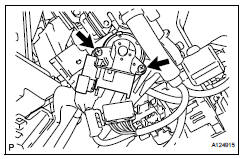
- Install the ignition switch with the 2 screws.
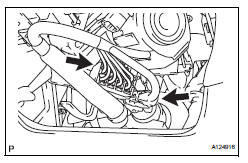
- Install the ignition key cylinder light connector.
- Install the ignition switch connector.
- Install steering column cover lower
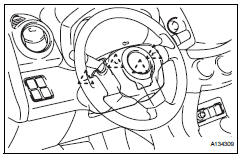
- Attach the 4 claws to install the steering column lower cover.
- Connect cable to negative battery terminal
 Inspection
Inspect ignition switch assembly
Measure the resistance of the switch.
Standard resistance
If the result is not as specified, replace the switch
assembly. ...
 2Az-fe charging
...
Other materials:
Turn signal lever
Operating instructions
Right turn
Lane change to the right
(move the lever partway and
release it)The right hand signals will flash 3
times.
Lane change to the left
(move the lever partway and
release it)
The left hand signals will flash 3
times.
Left turn
â– Turn signals can be operat ...
RSA (Road Sign Assist)
The RSA system recognizes
specific road signs using
the front camera to provide
information to the driver via
the display.
If the system judges that the
vehicle is being driven over
the speed limit, performing
prohibited actions, etc.
according to the recognized
road signs, it notifies
the driver ...
Manual air conditioning system
Air conditioning controls
Fan speed control switch
Temperature control switch
On/off switch
Windshield defogger switch
Rear window and outside rear view mirror defoggers* switch
Airflow mode control switch
Outside/recirculated air mode switch
"A/C" switch
"MAX A/C" switch
*: If equipped
...
