
Toyota RAV4 (XA40) 2013-2018 Owners Manual: Installing child restraints using a seat belt (child restraint lock function belt)
Rear-facing „o infant seat/convertible seat
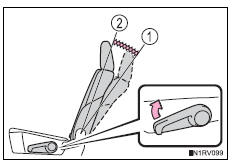
- Adjust the seatback to the 8th lock position from the fully reclined position.
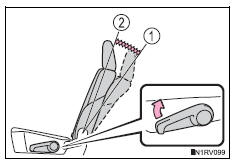
- Fully reclined position
- 8Th lock position
If your child restraint system interferes with a head restraint and cannot be installed properly, install the child restraint system after removing the head restraint.
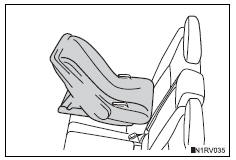
- Place the child restraint system on the rear seat facing the rear of the vehicle.
- Run the seat belt through the child restraint system and insert the plate into the buckle. Make sure that the belt is not twisted.
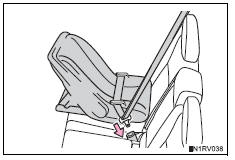
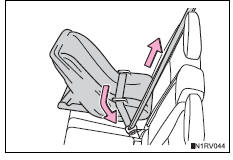
- Fully extend the shoulder belt and allow it to retract to put it in lock mode. In lock mode, the belt cannot be extended.
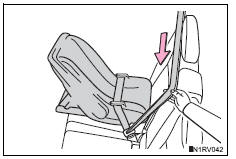
- While pushing the child
restraint system down into
the rear seat, allow the
shoulder belt to retract until
the child restraint system is
securely in place.
After the shoulder belt has retracted to a point where there is no slack in the belt, pull the belt to check that it cannot be extended.
Forward-facing „oƒnconvertible seat
- Adjust the seatback to the 8th lock position from the fully reclined position.
- Fully reclined position
- 8Th lock position
If your child restraint system interferes with a head restraint and cannot be installed properly, install the child restraint system after removing the head restraint.
- Place the child restraint system on the seat facing the front of the vehicle.
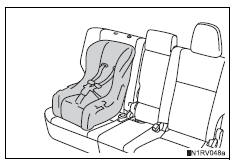
- Run the seat belt through the child restraint system and insert the plate into the buckle. Make sure that the belt is not twisted.
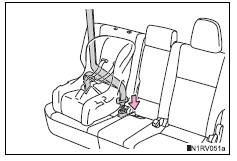
- Fully extend the shoulder belt and allow it to retract to put it in lock mode. In lock mode, the belt cannot be extended.
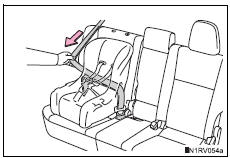
- While pushing the child
restraint system into the rear
seat, allow the shoulder belt
to retract until the child
restraint system is securely
in place.
After the shoulder belt has retracted to a point where there is no slack in the belt, pull the belt to check that it cannot be extended.
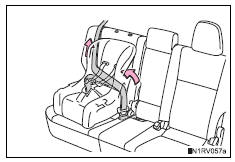
- If the child restraint has a top tether strap, the top tether strap should be latched onto the top tether strap anchor.
Booster seat
- Adjust the seatback to the 8th lock position from the fully reclined position.
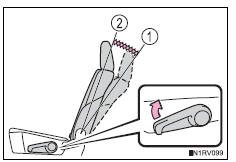
- Fully reclined position
- 8Th lock position
If your child restraint system interferes with a head restraint and cannot be installed properly, install the child restraint system after removing the head restraint.
- Place the child restraint system on the seat facing the front of the vehicle.
Booster type
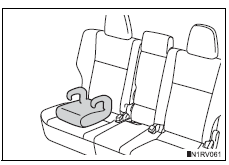
High back type
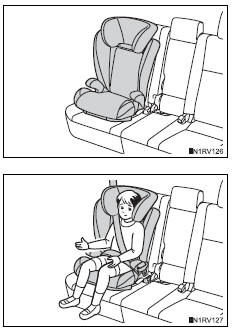
- Sit the child in the child
restraint system. Fit the seat
belt to the child restraint system
according to the manufacturer’s
instructions and
insert the plate into the
buckle. Make sure that the
belt is not twisted.
Check that the shoulder belt is correctly positioned over the child’s shoulder and that the lap belt is as low as possible.
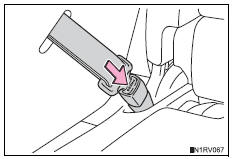
Removing a child restraint installed with a seat belt
Push the buckle release button and fully retract the seat belt.
 Installation with latch system
Adjust the seatback to the 8th
lock position from the fully
reclined position.
Fully reclined position
8Th lock position
If your child restraint system interferes with a head res ...
 Child restraint systems with a top tether strap
Secure the child restraint system
using the seat belt or
latch anchors.
Latch the hook onto the anchor
bracket and tighten the top
tether strap.
Make sure the top tether strap is
s ...
Other materials:
Check for short circuit
If the wire harness is ground shorted (fig. 5), Locate
the section by conducting a resistance check with
the body ground (below).
Check the resistance with the body ground.
Disconnect connectors a and c, and measure
the resistance
Standard resistance (fig. 6)
Hint:
Measure ...
Child restraint seat tether anchor
Components
Removal
Remove child restraint seat tether anchor cover
Using a screwdriver, detach the 4 claws and remove
the cover.
Hint:
Tape the screwdriver tip before use.
Remove roof headlining assembly
Hint:
It is not necessa ...
Data list / active tes
Read data list
Hint:
Using the intelligent tester's data list allows switch,
sensor, actuator and other item values to be read without
removing any parts. Reading the data list early in
troubleshooting is one way to save time.
Connect the intelligent tester (with can vim) to the
dlc3 ...
