
Toyota RAV4 (XA50) 2019-2026 Owners Manual: Luggage cover (if equipped)
â– Installing the luggage cover
1. Compress the both ends of the luggage cover and insert into the recess to install.
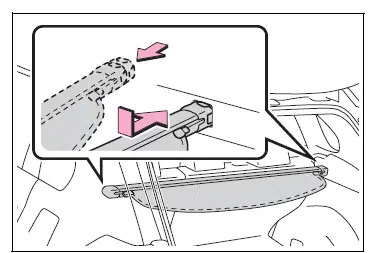
2. Pull out the luggage cover and hook it onto the anchors.
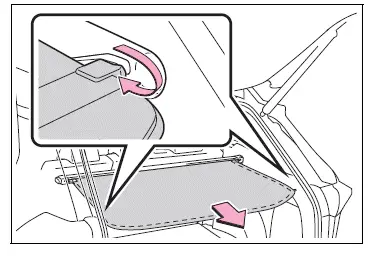
â– Removing the luggage cover
1. Release the cover from the left and right anchors and allow it to retract.
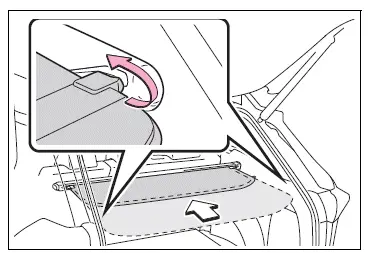
2. Compress the end of the luggage cover and lift the luggage cover up.
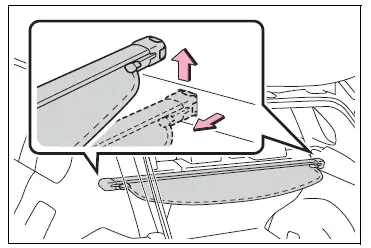
â– Stowing the luggage cover
1. Open the rear deck board and remove the side deck covers.
When the back surface (resin surface) of the deck board is facing up, remove the deck board.
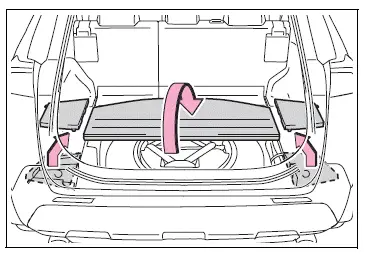
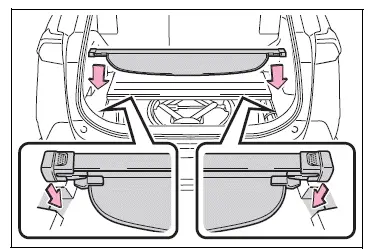
2. Place the both ends of the luggage cover into the holder.
WARNING
â– Luggage cover
- When installing/stowing the luggage cover, make sure that the luggage cover is securely installed/stowed. Failure to do so may result in serious injury in the event of sudden braking or a collision.
- Do not place anything on the luggage cover. In the event of sudden braking or turning, the item may go flying and strike an occupant. This could lead to an unexpected accident, resulting in death or serious injury.
- Do not allow children to climb on the luggage cover. Climbing on the luggage cover could result in damage to the luggage cover, possibly causing death or serious injury to the child.
â– To prevent damage to the luggage cover
Do not place anything on top of the luggage cover. When rolling up the luggage cover, objects may be caught in the cover, damaging the cover and generating noise.
 Luggage compartment features
Cargo hooks
Raise the hook to use.
The cargo hooks are provided for
securing loose items.
WARNING
â– When cargo hooks are not in
use
To avoid injury, always return the
hooks to their stowed position ...

Other materials:
Speed sensor
Components
Removal
Disconnect cable from negative battery
terminal
Caution:
Wait at least 90 seconds after disconnecting the
cable from the negative (-) battery terminal to
prevent airbag and seat belt pretensioner activation.
Remove battery
Loosen the nut and remove the b ...
If you have a flat tire
Your vehicle is equipped with a spare tire. The flat tire can be
replaced with the spare tire.
For details about tires
Caution
If you have a flat tire
Do not continue driving with a flat tire.
Driving even a short distance with a flat tire can damage the tire and the
wheel beyond repair, ...
Operation check
Illuminated entry system operation check
The illuminated entry system controls the following
lights:
Ignition key cylinder light*1 or transponder key
amplifier*2
Foot light
Map light and room light
Hint:
*1: W/o engine immobiliser system
*2: W/ engine immobiliser ...
