
Toyota RAV4 (XA50) 2019-2026 Owners Manual: PCS (Pre-Collision System)
The pre-collision system uses a radar sensor and front camera to detect objects in front of the vehicle. When the system determines that the possibility of a frontal collision with an object is high, a warning operates to urge the driver to take evasive action and the potential brake pressure is increased to help the driver avoid the collision. If the system determines that the possibility of a frontal collision with an object is extremely high, the brakes are automatically applied to help avoid the collision or help reduce the impact of the collision.
The pre-collision system can be disabled/enabled and the warning timing can be changed.
Detectable objects
The system can detect the following (The detectable objects differs depending on the function.):
- Vehicles
- Bicyclists
- Pedestrians
System functions
â– Pre-collision warning
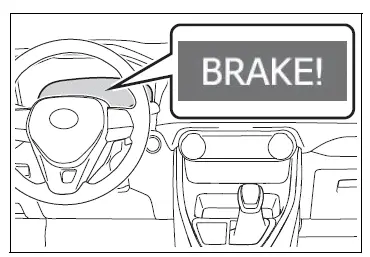
hen the system determines that the possibility of a frontal collision is high, a buzzer will sound and a warning message will be displayed on the multi-information display to urge the driver to take evasive action.
â– Pre-collision brake assist
When the system determines that the possibility of a frontal collision is high, the system applies greater braking force in relation to how strongly the brake pedal is depressed.
â– Pre-collision braking
If the system determines that the possibility of a frontal collision is extremely high, the brakes are automatically applied to help avoid the collision or reduce the impact of the collision.
â– Emergency steering assist
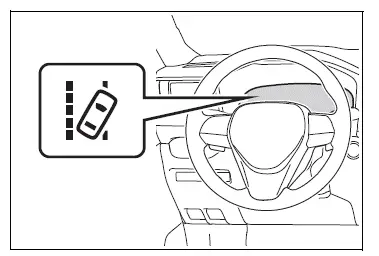
If the system determines that the possibility of a collision with a pedestrian is high and that there is sufficient space for the vehicle to be steered into within its lane, and the driver has begun evasive maneuver or steering, emergency steering assist will assist the steering movements to help enhance the vehicle stability and for lane departure prevention. During operation, the indicator will illuminate in green.
â– Intersection right/left turn assistance
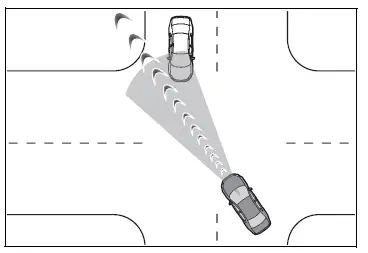
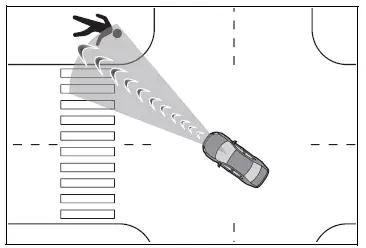
If the system determines that there is a high possibility of a collision in the following situations, it will assist with Pre-collision warning and, if necessary Pre-collision braking.
Depending on the configuration of the intersection, it may not be possible to support.
- When you turn right/left at an intersection and cross the path of an oncoming vehicle
- When you turn right/left, pedestrian is detected in the forward direction and estimated to enter your vehicle's path (bicyclists are not detected.)
WARNING
â– Limitations of the pre-collision system
- The driver is solely responsible
for safe driving. Always drive
safely, taking care to observe
your surroundings.
Do not use the pre-collision system instead of normal braking operations under any circumstances.
This system will not prevent collisions or lessen collision damage or injury in every situation. Do not overly rely on this system. Failure to do so may lead to an accident, resulting in death or serious injury.
- Although this system is
designed to help avoid a collision
or help reduce the impact
of the collision, its effectiveness
may change according to various
conditions, therefore the
system may not always be able
to achieve the same level of
performance.
Read the following conditions carefully. Do not overly rely on this system and always drive carefully.
- Conditions under which the system may operate even if there is no possibility of a collision
- Conditions under which the system may not operate properly
- Do not attempt to test the operation
of the pre-collision system
yourself.
Depending on the objects used for testing (dummies, cardboard objects imitating detectable objects, etc.), the system may not operate properly, possibly leading to an accident.
â– Pre-collision braking
- When the pre-collision braking function is operating, a large amount of braking force will be applied.
- If the vehicle is stopped by the operation of the pre-collision braking function, the pre-collision braking function operation will be canceled after approximately 2 seconds. Depress the brake pedal as necessary.
- The pre-collision braking function may not operate if certain operations are performed by the driver. If the accelerator pedal is being depressed strongly or the steering wheel is being turned, the system may determine that the driver is taking evasive action and possibly prevent the pre-collision braking function from operating.
- In some situations, while the pre-collision braking function is operating, operation of the function may be canceled if the accelerator pedal is depressed strongly or the steering wheel is turned and the system determines that the driver is taking evasive action.
- If the brake pedal is being depressed, the system may determine that the driver is taking evasive action and possibly delay the operation timing of the pre-collision braking function.
â– Emergency steering assist
- As emergency steering assist operation will be canceled when the system determines that lane departure prevention function has been completed.
- Emergency steering assist may not operate or may be cancel in the following cases as the system may determine the driver is taking actions.
- If the accelerator pedal is being depressed strongly, the steering wheel is being operated sharply, the brake pedal is being depressed or the turn signal lever is being operated. In this case, the system may determine that the driver is taking evasive action and the emergency steering assist may not operate.
- In some situations, while the emergency steering assist is operating, operation of the function may be canceled if the accelerator pedal is depressed strongly, the steering wheel is operated sharply or the brake pedal is being depressed and the system determines that the driver is taking evasive action.
- When the emergency steering assist is operating, if the steering wheel is held firmly or is operated in the opposite direction to that which the system is generating torque, the function may be canceled.
â– When to disable the pre-collision system
In the following situations, disable the system, as it may not operate properly, possibly leading to an accident resulting in death or serious injury:
- When the vehicle is being towed
- When your vehicle is towing another vehicle
- When transporting the vehicle via truck, boat, train or similar means of transportation
- When the vehicle is raised on a lift with the engine running and the tires are allowed to rotate freely
- When inspecting the vehicle using a drum tester such as a chassis dynamometer or speedometer tester, or when using an on vehicle wheel balancer
- When a strong impact is applied to the front bumper or front grille, due to an accident or other reasons
- If the vehicle cannot be driven in a stable manner, such as when the vehicle has been in an accident or is malfunctioning
- When the vehicle is driven in a sporty manner or off-road
- When the tires are not properly inflated
- When the tires are very worn
- When tires of a size other than specified are installed
- When tire chains are installed
- When a compact spare tire or an emergency tire puncture repair kit is used
- If equipment (snow plow, etc.) that may obstruct the radar sensor or front camera is temporarily installed to the vehicle
 Toyota Safety Sense 2.5
The Toyota Safety Sense
2.5 consists of the following
drive assist systems and
contributes to a safe and
comfortable driving experience:
Driving assist system
PCS (Pre-Collision System)
LTA (Lane T ...
 Changing settings of the
pre-collision system
Changing settings of the
pre-collision system
â– Enabling/disabling the pre-collision
system
The pre-collision system can be
enabled/disabled on the
screen of the
multi-information display.
The system is automatically
enabled each time the eng ...
Other materials:
Rear airbag sensor
Components
On-vehicle inspection
Check rear airbag sensor (vehicle not
involved in collision)
Perform a diagnostic system check (see page rs-
49).
Check rear airbag sensor (vehicle
involved in collision and airbag has not
deployed)
Perform a diagnostic system check ...
Headlight aim
Vertical movement adjusting
bolts
Adjustment bolt A
Adjustment bolt B
Before checking the headlight
aim
Make sure the vehicle has a
full tank of gasoline and the
area around the headlight is
not deformed.
Park the vehicle on level
ground.
Make sure the tire inflation
pressure is at the ...
Front seats
The seats can be adjusted
(longitudinally, vertically,
etc.). Adjust the seat to
ensure the correct driving
posture.
Adjustment procedure
Manual seat
Seat position adjustment
lever
Seatback angle adjustment
lever
Vertical height adjustment
lever (driver's side only)
Power seat
Seat posit ...
