
Toyota RAV4 (XA50) 2019-2026 Owners Manual: Toyota Safety Sense 2.5
The Toyota Safety Sense 2.5 consists of the following drive assist systems and contributes to a safe and comfortable driving experience:
Driving assist system
- PCS (Pre-Collision System)
- LTA (Lane Tracing Assist)
- AHB (Automatic High Beam)
- RSA (Road Sign Assist) (if equipped)
- Dynamic radar cruise control with full-speed range
WARNING
â– Toyota Safety Sense 2.5
The Toyota Safety Sense 2.5 is designed to operate under the assumption that the driver will drive safely, and is designed to help reduce the impact to the occupants and the vehicle in the case of a collision or assist the driver in normal driving conditions.
As there is a limit to the degree of recognition accuracy and control performance that this system can provide, do not overly rely on this system. The driver is always responsible for paying attention to the vehicle's surroundings and driving safely.
Sensors
Two types of sensors, located behind the front grille and windshield, detect information necessary to operate the drive assist systems.
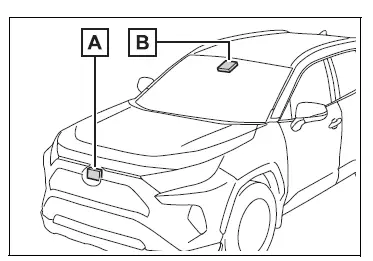
- Radar sensor
- Front camera
WARNING
â– To avoid malfunction of the radar sensor
Observe the following precautions.
Otherwise, the radar sensor may not operate properly, possibly leading to an accident resulting in death or serious injury.
- Keep the radar sensor and the radar sensor cover clean at all times.
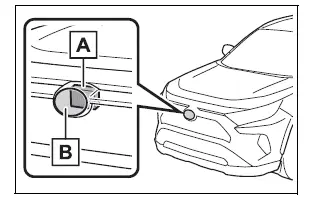
- Radar sensor
- Radar sensor cover
If the front of the radar sensor or the front or back of the radar sensor cover is dirty or covered with water droplets, snow, etc., clean it.
Clean the radar sensor and radar sensor cover with a soft cloth to avoid damaging them.
- Do not attach accessories, stickers (including transparent stickers) or other items to the radar sensor, radar sensor cover or surrounding area.
- Do not subject the radar sensor
or its surrounding area to a
strong impact.
If the radar sensor, front grille, or front bumper has been subjected to a strong impact, have the vehicle inspected by your Toyota dealer.
- Do not disassemble the radar sensor.
- Do not modify or paint the radar sensor or radar sensor cover.
- In the following cases, the radar
sensor must be recalibrated.
Contact your Toyota dealer for details.
- When the radar sensor or front grille are removed and installed, or replaced
- When the front bumper is replaced
â– To avoid malfunction of the front camera
Observe the following precautions.
Otherwise, the front camera may not operate properly, possibly leading to an accident resulting in death or serious injury.
- Keep the windshield clean at all
times.
- If the windshield is dirty or covered with an oily film, water droplets, snow, etc., clean the windshield.
- If a glass coating agent is applied to the windshield, it will still be necessary to use the windshield wipers to remove water droplets, etc. from the area of the windshield in front of the front camera.
- If the inner side of the windshield where the front camera is installed is dirty, contact your Toyota dealer.
- Do not attach objects, such as stickers, transparent stickers, etc., to the outer side of the windshield in front of the front camera (shaded area in the illustration).
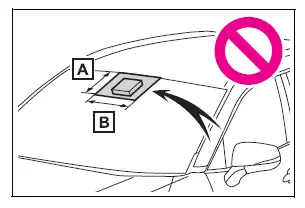
- From the top of the windshield to approximately 0.4 in. (1 cm) below the bottom of the front camera
- Approximately 7.9 in. (20 cm) (Approximately 4.0 in. [10 cm] to the right and left from the center of the front camera)
- If the part of the windshield in front of the front camera is fogged up or covered with condensation or ice, use the windshield defogger to remove the fog, condensation or ice.
- If water droplets cannot be properly removed from the area of the windshield in front of the front camera by the windshield wipers, replace the wiper insert or wiper blade.
- Do not attach window tint to the windshield.
- Replace the windshield if it is
damaged or cracked.
After replacing the windshield, the front camera must be recalibrated.
Contact your Toyota dealer for details.
- Do not allow liquids to contact the front camera.
- Do not allow bright lights to shine into the front camera.
- Do not dirty or damage the front
camera.
When cleaning the inside of the windshield, do not allow glass cleaner to contact the lens of the front camera. Also, do not touch the lens.
If the lens is dirty or damaged, contact your Toyota dealer.
- Do not subject the front camera to a strong impact.
- Do not change the installation position or direction of the front camera or remove it.
- Do not disassemble the front camera.
- Do not modify any components of the vehicle around the front camera (inside rear view mirror, etc.) or ceiling.
- Do not attach any accessories to the hood, front grille or front bumper that may obstruct the front camera. Contact your Toyota dealer for details.
- If a surfboard or other long object is to be mounted on the roof, make sure that it will not obstruct the front camera.
- Do not modify the headlights or other lights.
â– If a warning message is displayed on the multi-information display
A system may be temporarily unavailable or there may be a malfunction in the system.
- In the following situations, perform the actions specified in the table. When the normal operating conditions are detected, the message will disappear and the system will become operational.
If the message does not disappear, contact your Toyota dealer.
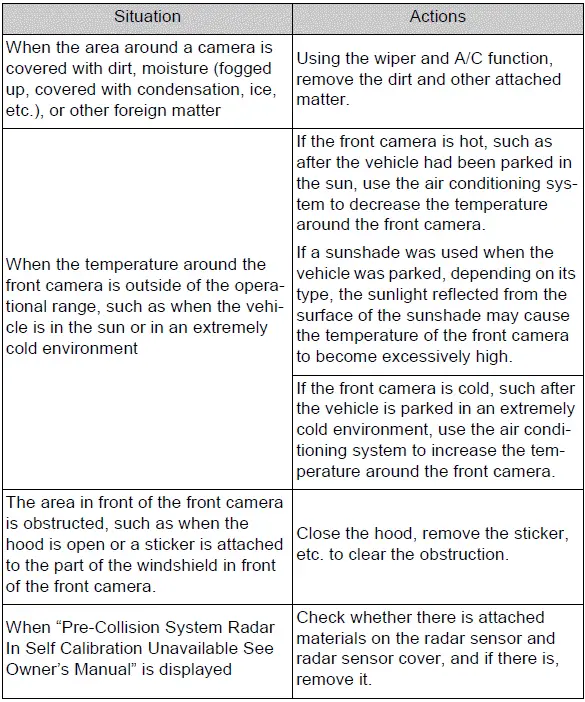
- In the following situations, if the situation has changed (or the vehicle has been driven for some time) and the normal operating conditions are detected, the message will disappear and the system will become operational.
If the message does not disappear, contact your Toyota dealer.
- When the temperature around the radar sensor is outside of the operational range, such as when the vehicle is in the sun or in an extremely cold environment
- When the front camera cannot detect objects in front of the vehicle, such as when driving in the dark, snow, or fog, or when bright lights are shining into the front camera
- Depending on the conditions in the vicinity of the vehicle, the radar may judge the surrounding environment can not be properly recognized. In that case, "Pre-Collision System Unavailable See Owner's Manual" is displayed.

 PCS (Pre-Collision System)
The pre-collision system
uses a radar sensor and
front camera to detect
objects in front of
the vehicle. When the system
determines that the
possibility of a frontal collision
with an object is high,
...
Other materials:
Air conditioning amplifier communication stop mode
Description
Wiring diagram
Inspection procedure
Notice:
Turn the ignition switch off before measuring the resistances
of the main wire and the branch
wire.
After the ignition switch is turned off, check that the key
reminder warning system and light
reminder warning sy ...
Diagnostic trouble code chart (2006/01- )
Hint:
When the air conditioning system functions properly, dtc
b1400/00 is output.
Hint:
*1: Dtc b1422/22 (compressor lock sensor circuit) is
indicated only for a currently occurring malfunction for 2grfe.
*2: Compressor and pulley for 2az-fe, compressor and
magnetic clutch for 2gr-fe ...
Air conditioning filter
The air conditioning filter
must be changed regularly
to maintain air conditioning
efficiency.
Removal method
1. Turn the engine switch to
OFF.
2. Open the glove box and slide
off the damper.
3. Push in each side of the
glove box to disconnect the
claws, and then slowly and
fully open the glove bo ...
