
Toyota RAV4 (XA40) 2013-2018 Service Manual: Removal
Caution:
Be sure to read the precautionary notices concerning the srs airbag system before servicing it (see page rs-1).
- Disconnect cable from negative battery terminal
Caution:
Wait at least 90 seconds after disconnecting the cable from the negative (-) battery terminal to prevent airbag and seat belt pretensioner activation.
- Remove steering pad assembly
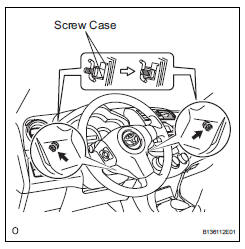
- Straighten the front wheels.
- Using a t30 "torx" driver, loosen the 2 screws until the groove along each screw circumference catches on the screw case.
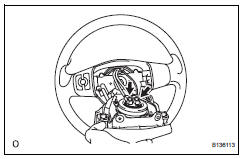
- Pull out the steering pad from the steering wheel and support the steering pad with one hand as shown in the illustration.
Notice:
When removing the steering pad, do not pull the airbag wire harness.
- Using a screwdriver, disconnect the 2 airbag connectors.
Caution:
When handling the airbag connector, do not damage the airbag wire harness.
- Disconnect the horn connector and remove the steering pad.
 On-vehicle inspection
Check steering pad assembly (vehicle not involved in collision and
airbag not deployed)
Perform a diagnostic system check (see page rs-
49).
With the steering pad (with airbag) ins ...
 Installation
Caution:
Be sure to read the precautionary notices concerning the
srs airbag system before servicing it (see page rs-1).
Install steering pad assembly
Support the steering pad with one ...
Other materials:
Differential case
Components
Disassembly
Remove front differential ring gear
Place the matchmarks on the ring gear and
differential case.
Remove the 14 bolts.
Using a plastic-faced hammer, tap on the ring gear
to remove it from the case.
Remove front differential case ...
Voice settings
This screen is used for setting the voice command guidance
system.
Adjust the voice guidance volume
setting.
Set the voice recognition
prompts “high�, “low� or “off�.
Train voice recognition
Set the voice prompt interrupt
on/off.
Voice recognition tutorial
To re ...
Using the “setup� menu (“bluetooth*� menu)
Registering a bluetooth® device in the system allows the system
to function. The following functions can be used for registered
devices:
Functions and operation procedures
Press the “setup� button and select “bluetooth*� using the
“tune•scroll� knob.
Press the knob and sele ...
