
Toyota RAV4 (XA40) 2013-2018 Service Manual: System description
- Key reminder warning system description
- When the driver side door is opened with the key in the ignition key cylinder and ignition switch in the acc or off position, this system causes the key reminder warning buzzer to sound in order to warn the driver that the ignition key has not been removed.
- Function of component
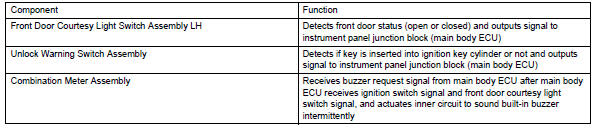
 Key reminder warning system
Parts location
System diagram
...
 How to proceed with troubleshooting
Hint:
Use these procedures to troubleshoot the key reminder
warning system.
*: Use the intelligent tester.
Vehicle brought to workshop
Inspect battery voltage
Standard voltage ...
Other materials:
Fog light assembly
Components
Removal
Hint:
Use the same procedures for the rh and lh sides.
The procedures listed below are for the lh side.
Disconnect cable from negative battery terminal
Caution:
Wait at least 90 seconds after disconnecting the
cable from the negative (-) battery terminal to
...
Operation flow
Hint:
Perform troubleshooting in accordance with the
procedures below. The following is an outline of basic
troubleshooting procedures. Confirm the troubleshooting
procedures for the circuit you are working on before
beginning troubleshooting.
Ask
the customer about the conditions and en ...
Fog light switch
The fog lights secure excellent visibility in difficult driving
conditions,
such as in rain and fog.
(U.S.A.) Or (canada)
turns the fog lights off
Turns the fog lights on
Fog lights can be used when
The headlights are on in low beam. ...
