
Toyota RAV4 (XA40) 2013-2018 Service Manual: Diagnostic trouble code chart
Hint:
If a trouble code is displayed during the dtc check, check the trouble areas listed for that code in the table below and proceed to the appropriate page.
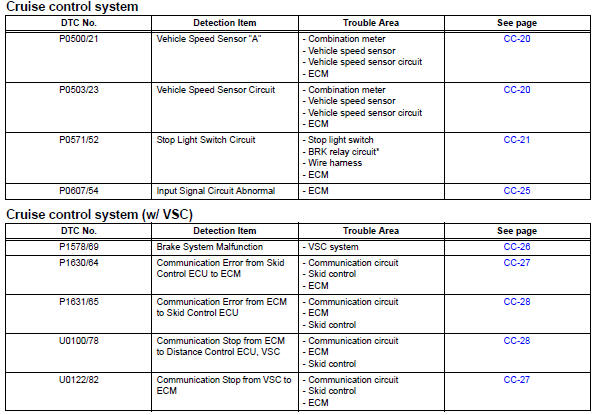
- Vehicle speed sensor
- Stop light switch circuit
- Input signal circuit abnormal
- Brake system malfunction
- Communication
- Cruise control switch circuit
 Data list / active tes
Read data list
Hint:
Using the intelligent tester's data list allows switch,
sensor, actuator and other item values to be read without
removing any parts. Reading the data list early in
trou ...
 Vehicle speed sensor
Description
Refer to the sfi system (see page es-224).
Wiring diagram
Refer to the sfi system (see page es-224).
Inspection procedure
Refer to the sfi system (see page es-224). ...
Other materials:
Air-fuel ratio (a/f) and heated oxygen (ho2) sensor
monitors (active air-fuel ratio control type)
Preconditions
The monitor will not run unless:
2 Minutes or more have elapsed since the engine
was started.
The engine coolant temperature (ect) is 75°c
(167°f) or more.
Cumulative driving time at a vehicle speed of 48
km/h (30 mph) or more exceeds 6 minutes.
Air-fuel rat ...
Snow mode switch (AWD
vehicles)
Snow mode can be selected
to suit the conditions when
driving on slippery road surfaces,
such as on snow.
System operation
â– Dynamic Torque Control
AWD vehicles
Press the snow mode switch.
When the switch is pressed, the
system switches to snow mode and
the snow mode indicator illuminates
on the ...
Brake switch "B" circuit high
Description
The purpose of this circuit is to prevent the engine from stalling while
driving in the lock-up condition when
the brakes are suddenly applied.
When the brake pedal is depressed, this switch sends a signal to the ecm. Then
the ecm cancels the
operation of the lock-up clutch ...
