
Toyota RAV4 (XA40) 2013-2018 Service Manual: Key reminder warning system
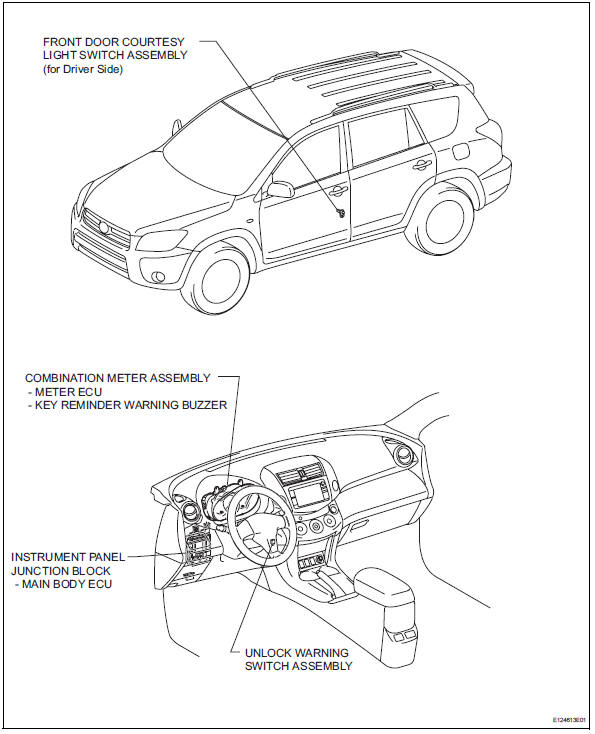
Parts location
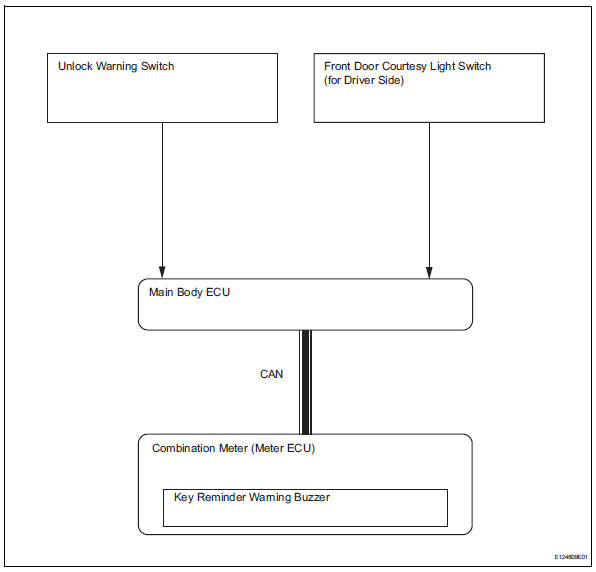
System diagram
- System description
- How to proceed with troubleshooting
- Operation check
- Problem symptoms table
- Terminals of ecu
- Diagnosis system
- Data list / active test
 Key lock-in prevention function does not work properly
Description
When the key is in the ignition key cylinder or the door courtesy light on
signal is output to the main body
ecu, performing the door lock operation with the lock switch does not lock ...
 System description
Key reminder warning system description
When the driver side door is opened with the key in
the ignition key cylinder and ignition switch in the
acc or off position, this system causes th ...
Other materials:
Panoramic moon roof
Use the overhead switches
to operate the panoramic
moon roof and electronic
sunshade.
Operating the electronic
sunshade and panoramic
moon roof
â– Opening and closing the
electronic sunshade
Opens the electronic sunshade*
Slide and hold the switch
backward. The electronic sunshade
will fully ...
Condenser
Components
On-vehicle inspection
Inspect cooler condenser assembly
If the fins of the cooler condenser are dirty, clean
them with water. Dry the fins with compressed air.
Notice:
Do not damage the fins of the condenser.
If a fin of the cooler condenser is bent, straighte ...
Lda
(lane departure alert)
Summary of function
While driving on a road that has lane markers, this system recognizes
the lane markers using a camera as a sensor to alert the driver when
the vehicle deviates from its lane.
If the system judges that the vehicle may deviate from its lane, it alerts
the driver using beepin ...
