
Toyota RAV4 (XA40) 2013-2018 Owners Manual: Automatic air conditioning system
Air outlets and fan speed are automatically adjusted according to the temperature setting.
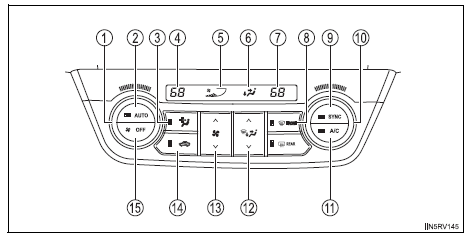
- Driver’s side temperature control dial
- Automatic mode button
- Micro dust and pollen filter mode button
- Driver’s side temperature setting display
- Fan speed display
- Air outlet display
- Passenger’s side temperature setting display
- Windshield defogger button
- Simultaneous mode button
- Passenger’s side temperature control dial
- Cooling and dehumidification function on/off button
- Air outlet selector button
- Fan speed control button
- Outside air or recirculated air mode button
- Off button
- Using the automatic air conditioning system
- Adjusting the settings manually
- Defogging the windshield
- Micro dust and pollen filter mode button
- Adjusting the position of and opening and closing the air outlets
 Air outlets and air flow
Upper body
Upper body and feet
Feet
Feet and windshield
Switching between outside air and recirculated air modes
Press .
The mode switches between outside air mode (indica ...
 Using the automatic air conditioning system
Press .
The dehumidification function begins to operate. Air outlets and fan speed
are automatically adjusted according to the temperature setting and
humidity.
Turn clockwis ...
Other materials:
Cargo and luggage
Take notice of the following
information about storage
precautions, cargo capacity
and load.
WARNING
â– Things that must not be carried
in the luggage compartment
The following things may cause a
fire if loaded in the luggage compartment:
Receptacles containing gasoline
Aerosol cans
â– Storage p ...
Rear brake
Components
Removal
Hint:
Use the same procedures for the lh side and rh side.
The procedures listed below are for the lh side.
Remove rear wheel
Drain brake fluid
Notice:
Wash off brake fluid immediately if it comes in
contact with any painted surface.
Disconnect rea ...
Mil circuit
Description
The mil (malfunction indicator lamp) is used to indicate vehicle malfunction
detections by the ecm.
When the ignition switch is turned on, power is supplied to the mil circuit, and
the ecm provides the
circuit ground which illuminates the mil.
The mil operation can be checked ...
