
Toyota RAV4 (XA50) 2019-2026 Owners Manual: Checking and adding the brake fluid
â– Checking fluid level
The brake fluid level should be between the "MAX" and "MIN" lines on the tank.
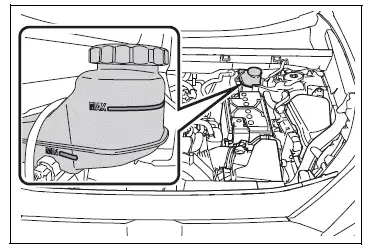
â– Adding fluid
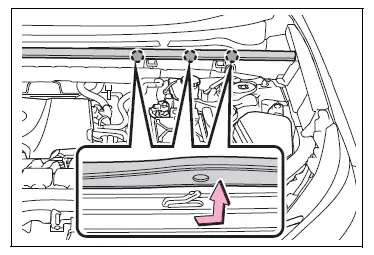
1. Slide and lift up the rubber strip to partly remove it as shown.
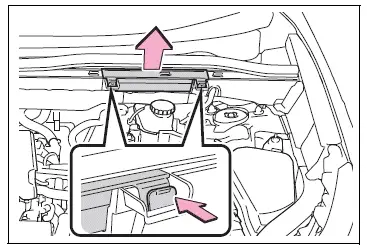
2. Disconnect the claws and remove the service cover.
3. Remove the reservoir cap.
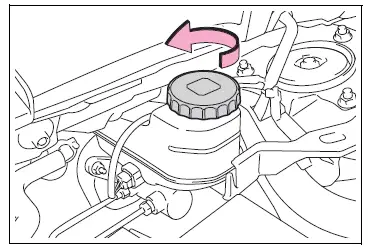
4. Add brake fluid slowly while checking the fluid level.
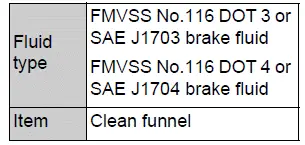
Make sure to check the fluid type and prepare the necessary item.
â– Brake fluid can absorb moisture from the air
Excess moisture in the brake fluid can cause a dangerous loss of braking efficiency. Use only newly opened brake fluid.
WARNING
â– When filling the reservoir
Take care as brake fluid can harm your hands and eyes and damage painted surfaces.
If fluid gets on your hands or in your eyes, flush the affected area with clean water immediately.
If you still experience discomfort, see a doctor.
NOTICE
â– If the fluid level is low or high
It is normal for the brake fluid level to go down slightly as the brake pads wear out or when the fluid level in the accumulator is high.
If the reservoir needs frequent refilling, there may be a serious problem.
 Checking the coolant
The coolant level is satisfactory
if it is between the "FULL" and
"LOW" lines on the reservoir
when the engine is cold.
Reservoir cap
"FULL" line
"LOW" line
If the level is on or below the "LOW" ...
 Checking the battery
Check the battery as follows.
â– Battery exterior
Make sure that the battery terminals
are not corroded and that
there are no loose connections,
cracks, or loose clamps.
Terminals
Hold-down clamp ...
Other materials:
Light bulbs
You may replace the following bulbs by yourself. The difficulty
level of replacement varies depending on the bulb. If necessary
bulb replacement seems difficult to perform, contact your
toyota dealer.
For more information about replacing other light bulbs, contact
your toyota dealer.
Prepari ...
Rear center seat outer belt assembly
Components
Removal
Caution:
Wait at least 90 seconds after disconnecting the cable
from the negative (-) battery terminal to prevent airbag
and seat belt pretensioner activation.
Remove shoulder belt anchor cover rh
Using a screwdriver, remo ...
Installation
Hint:
Use the same procedures for the rh side and lh side.
The procedures listed below are for the lh side.
Install front door belt moulding
assembly lh
Attach the claws to install the belt moulding.
Hint:
Confirm that the moulding is firmly installed.
Install outer r ...
