
Toyota RAV4 (XA40) 2013-2018 Service Manual: Combination meter ecu communication stop mode
Description

Wiring diagram
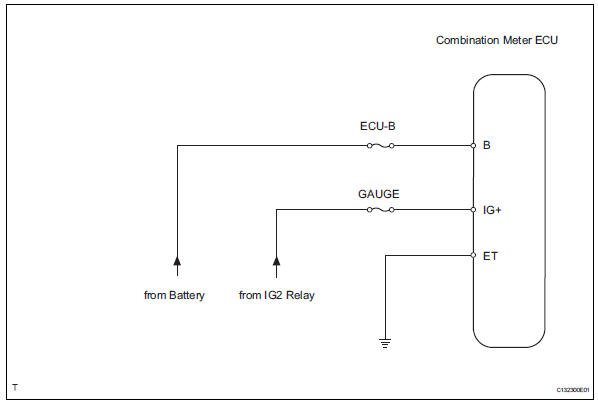
Inspection procedure
Notice:
- Turn the ignition switch off before measuring the resistances of the main wire and the branch wire.
- After the ignition switch is turned off, check that the key reminder warning system and light reminder warning system are not in operation.
- Before measuring the resistance, leave the vehicle for at least 1 minute and do not operate the ignition switch, any switches or doors. If doors need to be opened in order to check connectors, open the doors and leave them open.
Hint:
Operating the ignition switch, any switches or any doors triggers related ecu and sensor communication with the can, which causes resistance variation.
- Check wire harness (combination meter ecu - battery and body ground)
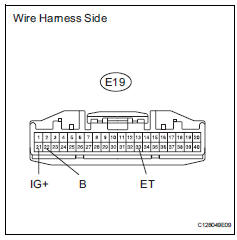
- Disconnect the e19 combination meter ecu connector.
- Measure the resistance of the wire harness side connector.
Standard resistance
- Measure the voltage of the wire harness side connector.
Standard voltage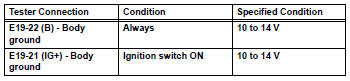


Replace combination meter ecu
 Main body ecu communication stop mode
Description
Wiring diagram
Inspection procedure
Notice:
Turn the ignition switch off before measuring the resistances of the
main wire and the branch
wire.
After the ignition sw ...
 Center airbag sensor communication stop mode
Description
Wiring diagram
Inspection procedure
Notice:
Turn the ignition switch off before measuring the resistances of the
main wire and the branch
wire.
After the ignition swi ...
Other materials:
Seat heater system
Parts location
System diagram
Problem symptoms table
Hint:
Use the table below to help determine the cause of the
problem symptom. The potential causes of the symptoms are
listed in order of probability in the "suspected area" column
of the table. Check each symptom by check ...
Air conditioning filter
The air conditioning filter must be changed regularly to maintain
air conditioning efficiency.
Removal method
Vehicles without a smart key system: turn the engine switch to the
“lock� position.
Vehicles with a smart key system: turn the engine switch off.
Open the glove box. Slide ...
Camshaft position correlation (bank 1 sensor a)
Dtc P0016 P0016 crankshaft position - camshaft position correlation
(bank 1 sensor a)
Description
In the vvt (variable valve timing) system, the appropriate intake valve open
and close timing is
controlled by the ecm. The ecm performs intake valve control by performing the
following: 1) cont ...
