
Toyota RAV4 (XA40) 2013-2018 Service Manual: Data list / active test
- Read data list
Hint:
Using the intelligent tester's data list allows switch, sensor, actuator and other item values to be read without removing any parts. Reading the data list early in troubleshooting is one way to save time.
- Connect the intelligent tester (with can vim) to the dlc3.
- Turn the ignition switch on and turn the tester on.
- Select the following menu items: diagnosis / obd/mobd / immobiliser / data list.
- Check the results by referring to the table below.
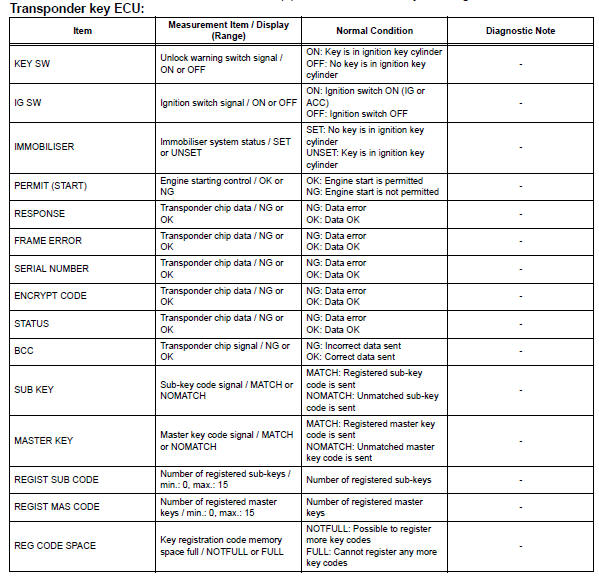
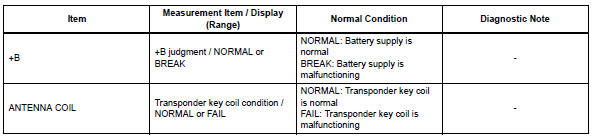
- Perform active test
Hint:
performing the intelligent tester's active test allows relay, vsv, actuator and other items to be operated without removing any parts. performing the active test early in troubleshooting is one way to save time.
the data list can be displayed during the active test.
- Connect the intelligent tester (with can vim) to the dlc3.
- Turn the ignition switch on and turn the tester on.
- Select the following menu items: diagnosis / obd/mobd / immobiliser / active test.
- Perform the active test by referring to the table below.

 Dtc check / clear
Check dtc
Connect the intelligent tester (with can vim) to the
dlc3.
Turn the ignition switch on and turn the intelligent
tester on.
Select the following menu items: diagnosis /
...

Other materials:
Engine immobilizer system
The vehicle's keys have
built-in transponder chips
that prevent the engine from
starting if a key has not
been previously registered
in the vehicle's on-board
computer.
Never leave the keys inside
the vehicle when you leave
the vehicle.
This system is designed to
help prevent vehicle theft but
does ...
Evaporative emission system reference orifice
Dtc summary
Hint:
The reference orifice is located inside the canister pump module.
Description
The description can be found in the evap (evaporative emission) system (see
page es-335).
Inspection procedure
Refer to the evap system (see page es-340).
Monitor description
5 Hours* af ...
On-vehicle inspection
Notice:
Perform the maf meter inspection according to the
procedures below.
Only replace the maf meter when both the long
ft#1 value and maf value in the data list (with the
engine stopped) are not within the normal operating
range.
Inspect mass air flow meter
Perform c ...
