
Toyota RAV4 (XA40) 2013-2018 Service Manual: Diagnostic trouble code chart
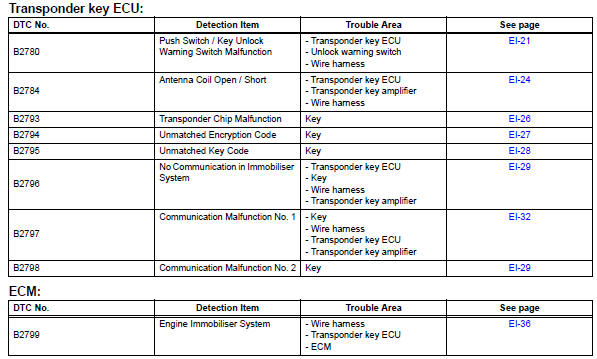
- Push switch / key unlock warning switch malfunction
- Antenna coil open / short
- Transponder chip malfunction
- Unmatched encryption code
- Unmatched key code
- Communication
- Communication malfunction no. 1
- Engine immobiliser system malfunction
- Security indicator light circuit
 Data list / active test
Read data list
Hint:
Using the intelligent tester's data list allows switch,
sensor, actuator and other item values to be read without
removing any parts. Reading the data list early in
trou ...
 Push switch / key unlock warning switch malfunction
Description
This dtc is output if the transponder key ecu does not detect that the unlock
warning switch is on even
when the ignition switch is on. Under normal conditions, the unlock warning ...
Other materials:
Removal (2005/11-2006/01)
Remove front wheel
Drain automatic transaxle fluid
Drain the automatic transaxle fluid for u140f (see
page ax-147).
Drain the automatic transaxle fluid for u241e (see
page ax-146).
Remove front axle hub nut (see page ah-6)
Disconnect front speed sensor lh
Disconnect th ...
Power steering ecu
Components
Removal
Disconnect cable from negative battery
terminal
Remove instrument panel sub-assembly
upper
Remove the instrument panel (see page ip-4).
Remove power steering ecu
Disconnect the 4 connectors.
Remove the 3 nuts and remove the power steering
e ...
Parts location
System diagram
System description
Cruise control system
This system is controlled by the ecm, and is activated by
the throttle position sensor and motor. The ecm controls
the following functions: on-off, set / coast,
resume / accel, cancel, vehicle speed operation,
motor ...
