
Toyota RAV4 (XA40) 2013-2018 Service Manual: Dtc check / clear
- Check dtc
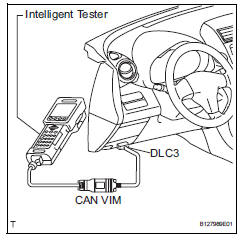
- When using intelligent tester:
- Connect the intelligent tester (with can vim) to the dlc3.
- Turn the ignition switch on and press the intelligent tester main switch on.
- Read the dtcs by following the prompts on the intelligent tester.
Hint:
Refer to the intelligent tester operator's manual for further details.
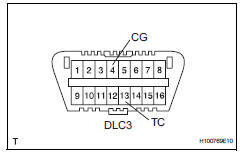
- When not using intelligent tester:
- Using sst, connect terminals 13 (tc) and 4
(cg) of the dlc3.
Sst 09843-18040
- Turn the ignition switch on.
- Read and write down any dtcs indicated by the
p/s warning light on the combination meter.
Refer to the chart below for examples of a normal code and dtcs 21 and 22.
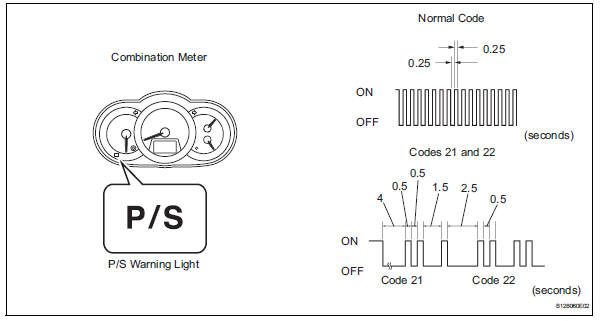
Hint:
- If the p/s warning light does not blink to
display any dtcs set or the normal code,
inspect the circuit shown in the table below.

- If two or more malfunctions are detected simultaneously, dtcs will be displayed in ascending numerical order.
- Refer to the diagnostic trouble code chart (see page ps-16) for dtc information.
- Clear dtc
- When using intelligent tester:
- Connect the intelligent tester (with can vim) to the dlc3.
- Turn the ignition switch on and press the intelligent tester main switch on.
- Clear the dtcs by following the prompts on the intelligent tester.
- Turn the ignition switch off.
- Disconnect the intelligent tester from the dlc3.
- When not using intelligent tester:
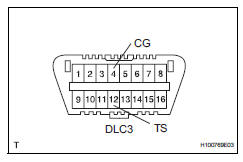
- Using sst, connect terminals 12 (ts) and 4
(cg) of the dlc3.
Sst 09843-18040
- Turn the ignition switch on.
- Disconnect the sst check wire from terminal 4 (cg) and reconnect it, and repeat this procedure 4 times or more within 8 seconds.
- Check that the p/s warning light blinking pattern is the normal code.
- Turn the ignition switch off.
- Remove sst from the dlc3.
 Diagnosis system
Check dlc3
Check the dlc3:
the power steering ecu uses can (iso11898-1)
and iso9141-2 for communication protocol. The
terminal arrangement of the dlc3 complies with
sae j1962 and ...
 Freeze frame data
Freeze frame data
Notice:
It is difficult to show the specified values
(judgment values) clearly because freeze frame
data values change significantly due to
differences in measurement ...
Other materials:
Changing settings of the
pre-collision system
â– Enabling/disabling the pre-collision
system
The pre-collision system can be
enabled/disabled on the
screen of the
multi-information display.
The system is automatically
enabled each time the engine
switch is turned to ON.
If the system is disabled, the
PCS warning light will turn on
and a mes ...
How to proceed with troubleshooting
Hint:
Use these procedures to troubleshoot the vehicle stability
control system.
*: Use the intelligent tester.
Vehicle brought to workshop
Inspect battery voltage
Standard voltage:
11 to 14 v
If the voltage is below 11 v, recharge or replace the battery
before proceedin ...
Evaporative emission leak detection pump
Dtc summary
Hint:
The leak detection pump is built into the canister pump module.
Description
The description can be found in the evap (evaporative emission) system (see
page es-335).
Inspection procedure
Refer to the evap system (see page es-340).
Monitor description
5 Hours* afte ...
