
Toyota RAV4 (XA40) 2013-2018 Service Manual: Front airbag sensor
Components
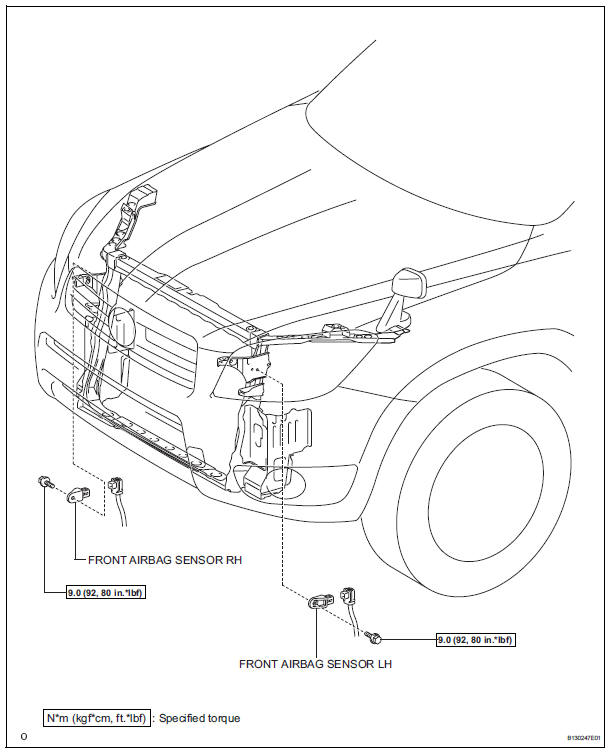
On-vehicle inspection
- Check front airbag sensor (vehicle not involved in collision and airbag not deployed)
- Perform a diagnostic system check (see page rs- 49).
- Check front airbag sensor (vehicle involved in collision and airbag has not deployed)
- Perform a diagnostic system check (see page rs- 49).
- If the front fender of the vehicle or its periphery are damaged, perform a visual check:
- Check for cracks, dents or chips in the case.
- Check for cracks, dents, chips and scratches in the connector.
- Check for peeling off of the label or damage to the serial number.
If any of the defects mentioned above are present, replace the front airbag sensor with a new one.
- Check front airbag sensor (vehicle involved in collision and airbag has deployed)
- Replace the front airbag sensor.
Caution:
For removal and installation of the front airbag sensor, be sure to follow the correct procedures.
Hint:
If the airbags have deployed, replace the front airbag sensor on the side in which the collision occurred. Replace both if necessary.
Removal
Caution:
Be sure to read the precautionary notices concerning the srs airbag system before servicing it (see page rs-1).
- Disconnect cable from negative battery terminal
Caution:
Wait at least 90 seconds after disconnecting the cable from the negative (-) battery terminal to prevent airbag and seat belt pretensioner activation.
- Remove radiator support opening cover
- Remove front airbag sensor lh
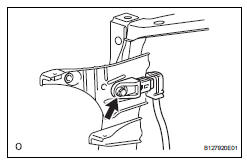
- Disconnect the sensor connector.
- Remove the bolt and sensor.
- Remove front airbag sensor rh
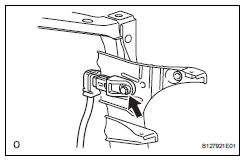
- Disconnect the sensor connector.
- Remove the bolt and sensor.
Installation
Caution:
Be sure to read the precautionary notices concerning the srs airbag system before servicing it (see page rs-1).
- Install front airbag sensor lh
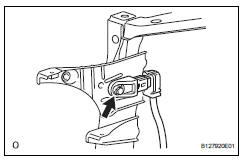
- Install the sensor with the bolt.
Torque: 9.0 N*m (92 kgf*cm, 80 in.*Lbf)
Notice:
- If the airbag sensor has been dropped, or there are any cracks, dents or other defects in the case or connector, replace it with a new one.
- When installing the airbag sensor, make sure that the srs wiring does not interfere with other parts and is not pinched between other parts.
- Check that there is no free play in the installation parts of the sensor.
- Connect the sensor connector.
- Install front airbag sensor rh
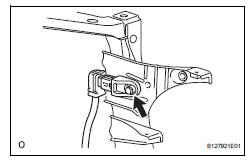
- Install the sensor with the bolt.
Torque: 9.0 N*m (92 kgf*cm, 80 in.*Lbf)
Notice:
- If the airbag sensor has been dropped, or there are any cracks, dents or other defects in the case or connector, replace it with a new one.
- When installing the airbag sensor, make sure that the srs wiring does not interfere with other parts and is not pinched between other parts.
- check that there is no free play in the installation parts of the sensor.
- Connect the sensor connector.
- Install radiator support opening cover
- Connect cable to negative battery terminal
- Check srs warning light
- Check the srs warning light (see page rs-34).
 Sruepsptrleaminetnstal restraint system center airbag sensor assembly
Components
On-vehicle inspection
Check center airbag sensor assembly
(vehicle not involved in collision and
airbag not deployed)
Perform a diagnostic system check (see page rs-
49 ...
 Side airbag sensor
Components
On-vehicle inspection
Check side airbag sensor (vehicle not
involved in collision)
Perform a diagnostic system check (see page rs-
49).
Check side airbag sensor (ve ...
Other materials:
Downhill assist control switch
Components
Removal
Disconnect cable from negative battery
terminal
Caution:
Wait at least 90 seconds after disconnecting the
cable from the negative (-) battery terminal to
prevent airbag and seat belt pretensioner activation.
Remove downhill assist control switch
Detach t ...
Compressor circuit
Description
When the a/c switch is turned on, the magnetic clutch on signal is sent from
the air conditioning
amplifier. Then the mg clt relay turns on to operate the magnetic clutch.
Wiring diagram
Inspection procedure
Inspection procedure
Perform active test by intelligent tester (a ...
Components
...
