
Toyota RAV4 (XA40) 2013-2018 Service Manual: Front door lock
Inspection
- Inspect front door with motor lock assembly lh
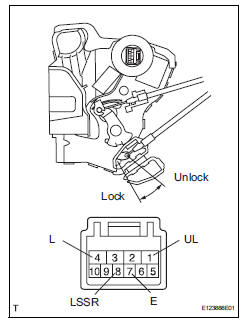
- Apply the battery voltage to the motor terminals and check the operation of the door lock motor.
Ok 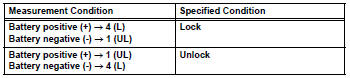
If the result is not as specified, replace the door lock assembly.
- Measure the resistance of the door lock position switch.
Standard resistance 
If the result is not as specified, replace the door lock assembly.
- Measure the resistance of the door key lock and unlock switch operation.
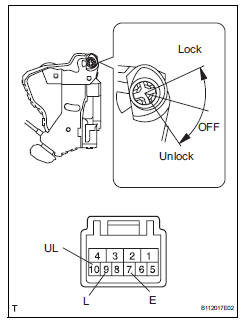
Standard resistance 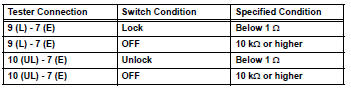
If the result is not as specified, replace the door lock assembly.
- Inspect front door with motor lock assembly rh
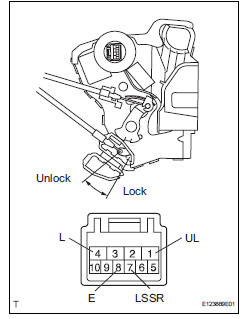
- Apply the battery voltage to the door lock motor and check that the operation of the door lock motor.
Ok 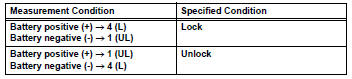
If the result is not as specified, replace the door lock assembly.
- Measure the resistance of the door lock position switch.
Standard resistance 
If the result is not as specified, replace the door lock assembly.
 Door control switch
Inspection
Inspect power window regulator master
switch assembly (door control switch)
Measure the resistance of the door control switch.
Standard resistance
If the result is not ...
 Back door lock
Inspection
Inspect back door with motor lock assembly
Apply the battery voltage to the door lock motor and
check the operation of the door lock motor.
Ok
If the result is not as sp ...
Other materials:
Removal
Hint:
Use the same procedures for the rh side and lh side.
The procedures listed below are for the lh side.
Disconnect cable from negative battery terminal
Notice:
Wait at least 90 seconds after disconnecting the
cable from the negative (-) battery terminal to
prevent airbag and se ...
Front brake
Components
Removal
Hint:
Use the same procedures for the lh side and rh side.
The procedures listed below are for the lh side.
Remove front wheel
Drain brake fluid
Notice:
Wash off brake fluid immediately if it comes in
contact with any painted surface.
Disconnec ...
Head restraints
Head restraints are provided
for all seats.
WARNING
â– Head restraint precautions
Observe the following precautions
regarding the head restraints.
Failure to do so may result in
death or serious injury.
Use the head restraints
designed for each respective
seat.
Adjust the head restraints to th ...
